How Auto Recycling Marketers works — from the first click to the booked pickup
Two things win in the junk-car business: enough of the right people finding you, and a fast way to turn them into paid cars in your yard. This is the full tour of how we do both — the marketing that drives the traffic, and the Quote Engine that closes it.
Read it top to bottom and you'll see the whole machine: how a car seller searching Google ends up as a qualified lead with photos, a VIN and a pickup address sitting in your dashboard — and every tool, screen and automation in between. Use the menu on the left to jump to any part.
Part 0The whole system at a glance
Most companies sell you one piece — ads, or a website, or software. The gap between the pieces is where money leaks out. We built one connected system so nothing falls through.
Here is the entire thing in one sentence: we put you in front of people who are actively trying to sell their car, we make sure every click and call is tracked and protected, and we hand each one to a Quote Engine that turns it into a real cash offer and a scheduled pickup. Three stages, one loop:
Get found
Google Ads, SEO and your Google Business Profile put you in front of sellers at the exact moment they search — paid traffic today, organic traffic that compounds over time.
Capture
Every visitor hits a fast, keyword-matched landing page and a Quote Engine that gives a real offer in about 30 seconds — turning anonymous clicks into named leads with photos, VINs and addresses.
Close
AI phone and SMS follow-up, a customer offer portal, and driver dispatch help you book, collect and pay for more of those cars — with every lead tracked back to the ad, keyword or page that produced it.
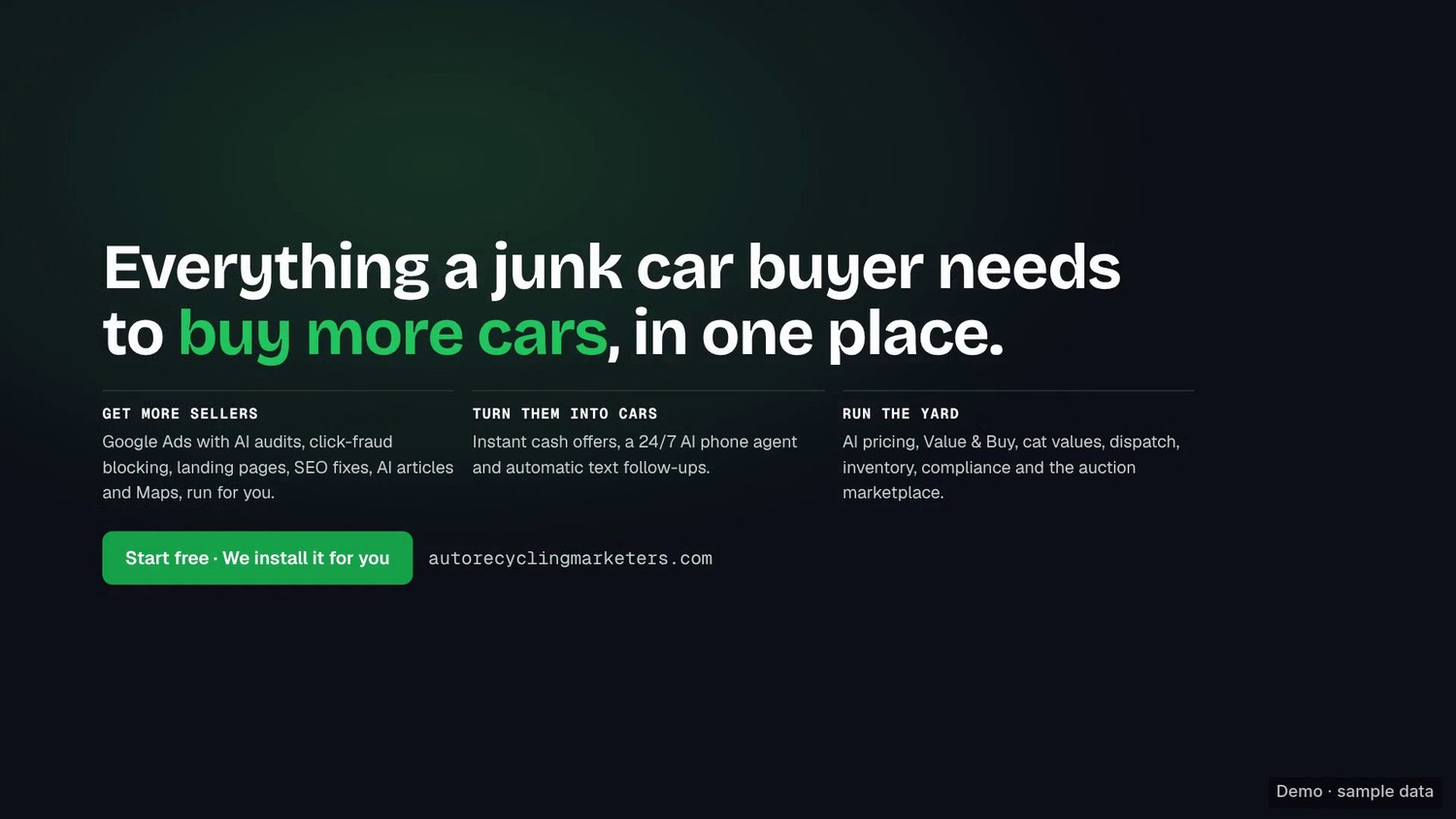
The reason this matters is attribution. Because the same system runs your ads and your lead capture, it can tell you the one thing most recyclers never learn: which keyword, which ad, and which page actually produced a paid car — not just a click, not just a form fill, but a car on the truck. That closed loop is what lets us cut the spend that doesn't work and pour budget into the spend that does.
Part 1What happens when you sign up
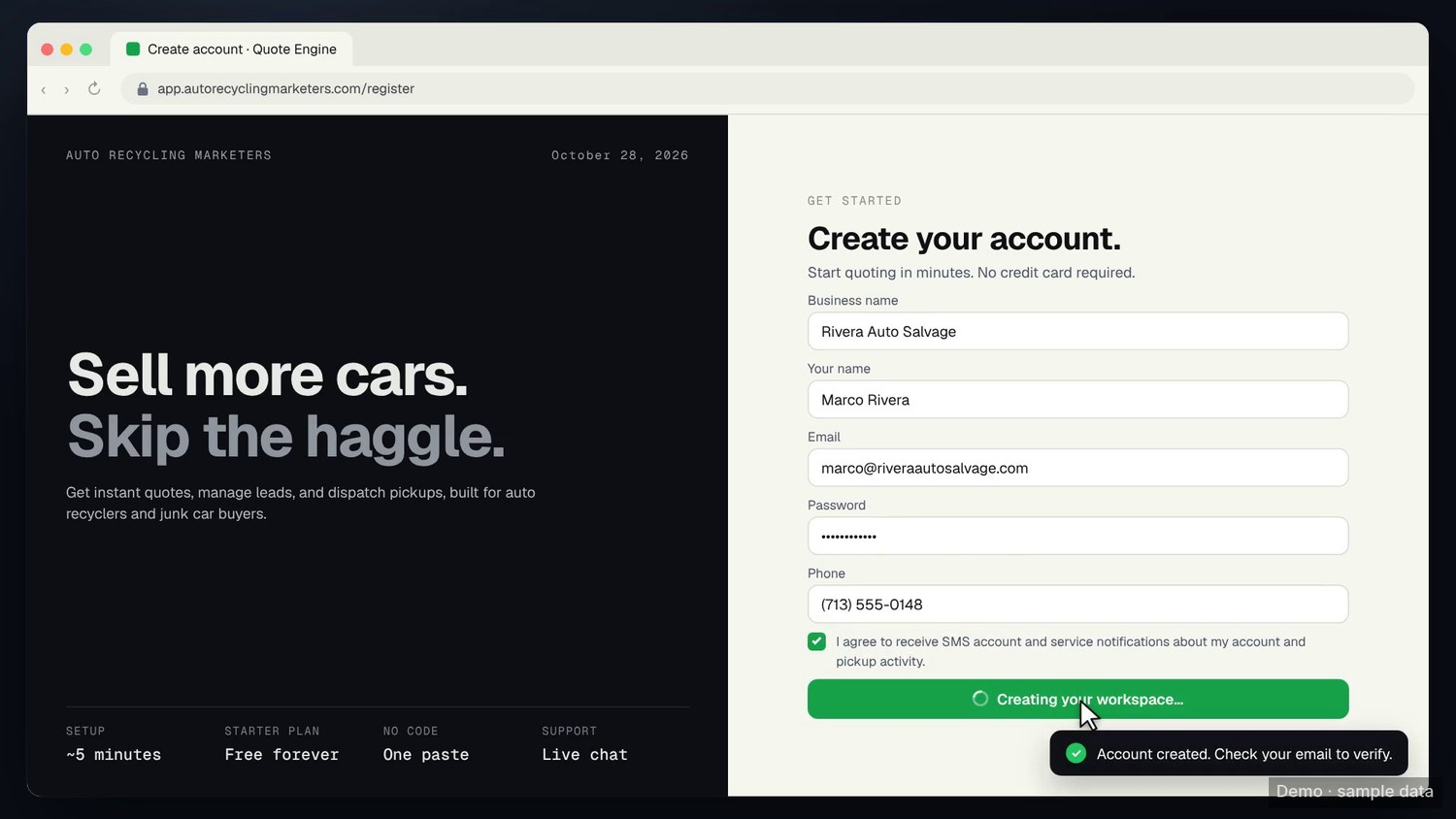
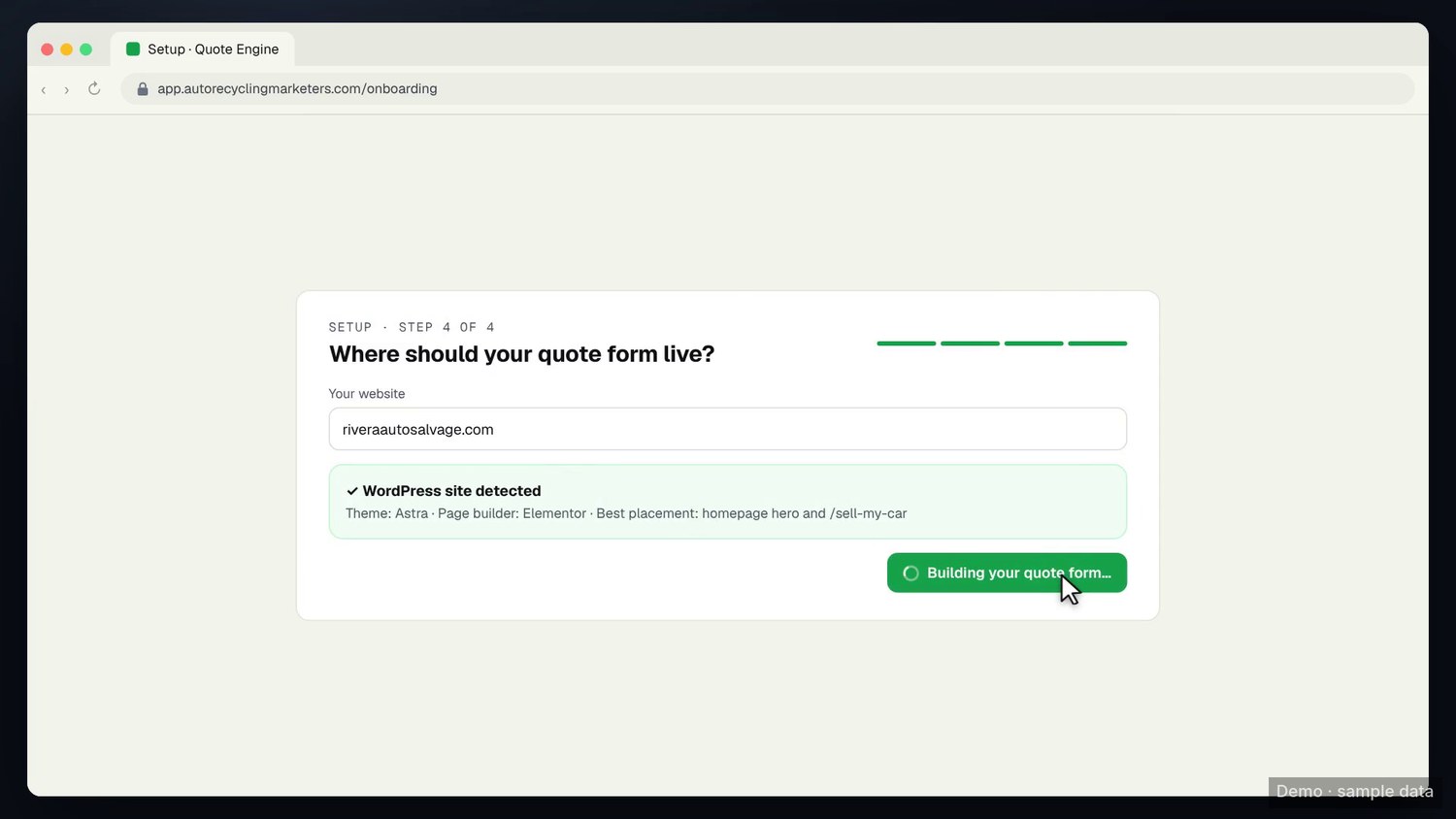
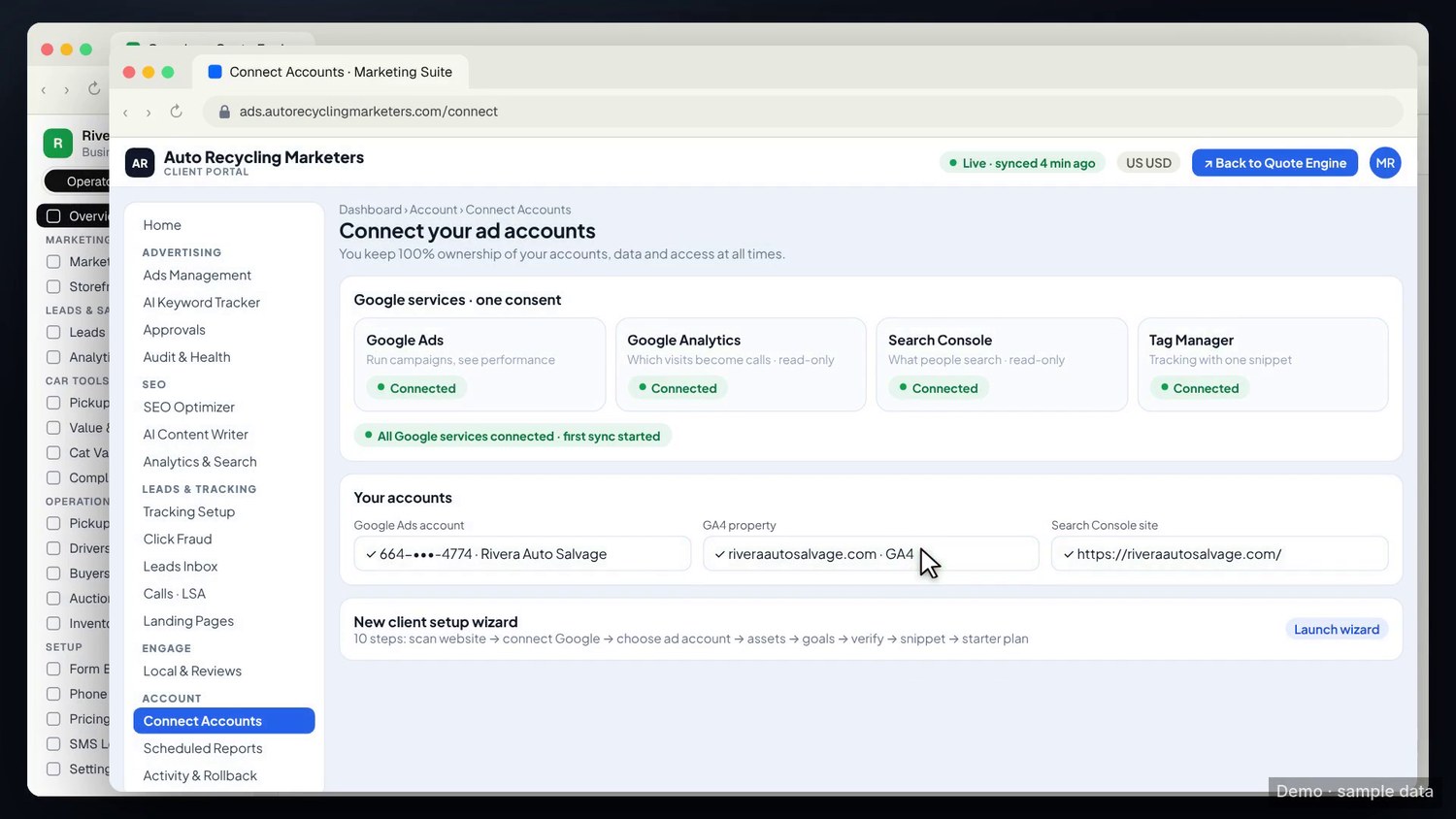
You don't start with a blank screen and a manual. Signing up kicks off a guided setup that gets you to a working lead machine in minutes, then hands you a prioritized to-do list instead of a dashboard full of mystery.
The free account is the front door. You create it with no credit card, and from the first screen the platform walks you through a short, visible checklist — the same five steps every account completes, each one ticking off automatically as you finish it:
Connect Google
One secure sign-in links your Google Ads and Google Business Profile so the system can read your real numbers — spend, clicks, conversions, map rank — instead of guessing.
Pick your ad account & assets
You choose which Google Ads account and which business the workspace manages. From here on, every screen is scoped to that business.
Install the tracking snippet
One script tag (or an automatic install on our hosted landing pages) turns on conversion tracking, click-fraud analysis and lead attribution across your site.
Run your first audit
The system crawls your account and your site and produces a health score with a ranked list of exactly what's costing you money and what's being left on the table.
Review recommendations
You land on a prioritized action list — the single most important fix first — each with a one-click Apply and a one-click Undo.
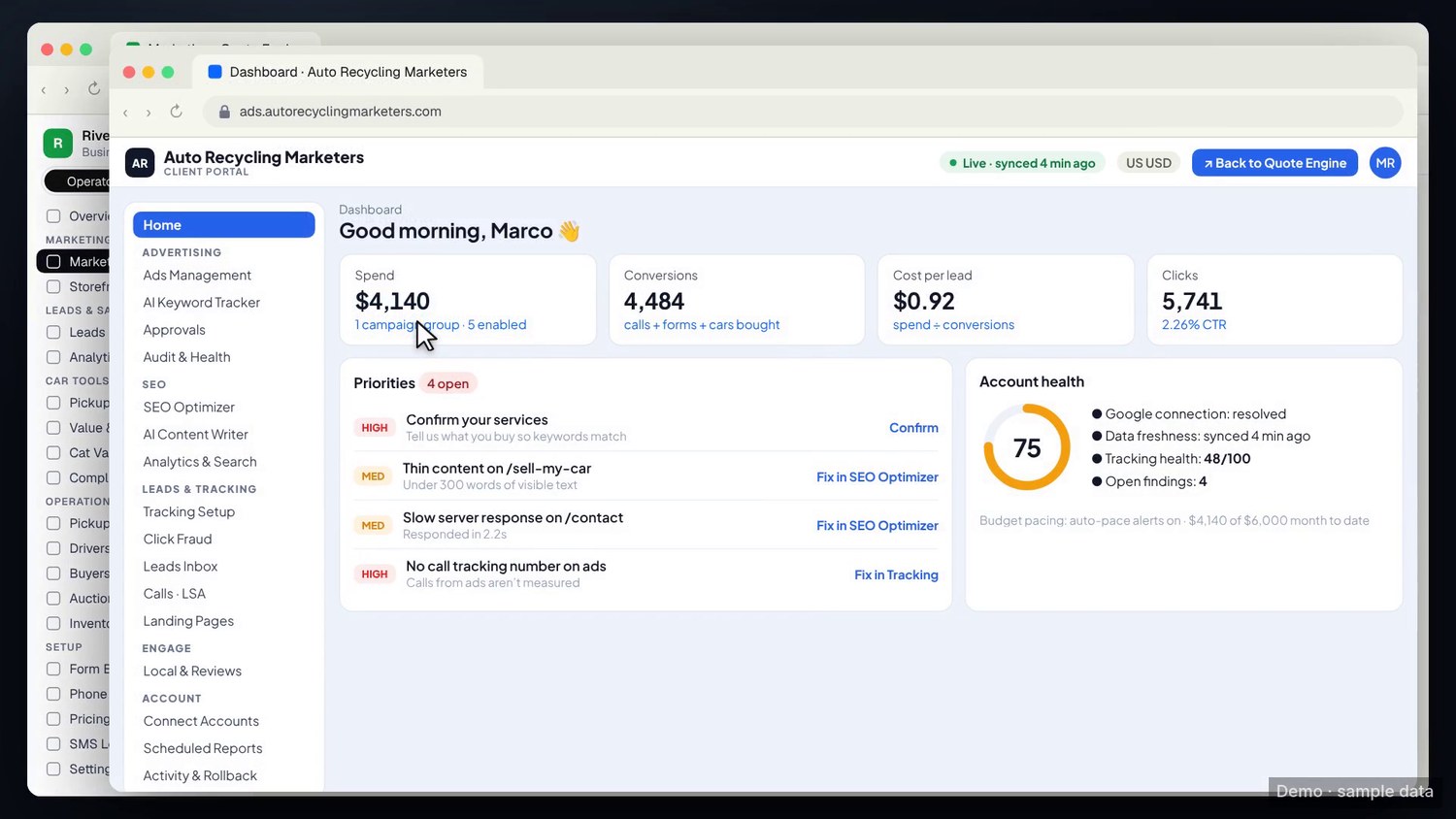
From that moment the dashboard is a working cockpit, not a report. The top of the page always shows the four numbers that actually matter — spend, conversions, cost per lead, and clicks, each with its 30-day trend — so you can tell at a glance whether this month is better or worse than last. Below that sits the Priorities panel: the system's current opinion, ranked by severity, of what deserves your attention right now. A dropped-to-zero conversion alert. A search term quietly burning budget. A winning keyword you haven't added yet. Each item explains itself in plain language and, where it's safe, offers to fix itself.
If you're on a done-for-you plan, you don't even have to watch it — your account manager works that same list on your behalf, and you get a branded weekly or monthly report showing what changed and what it did to your numbers. The rest of this page walks through every engine feeding that cockpit, starting with the one that brings the fastest traffic: paid advertising.
Part 2Paid advertising & Google Ads
Paid search is the fastest water you can turn on. The day a campaign goes live, people who are typing "cash for cars near me" into Google can be looking at your ad. The hard part isn't turning it on — it's making sure the money buys cars instead of clicks. That's the whole job, and it's what this engine is built for.
When someone decides to get rid of a car, they don't wander — they search. "Sell my car for cash," "junk car removal," "scrap my car Calgary." Google Ads lets you appear at the top of that result the moment they do. You only pay when someone clicks, and you choose how much a click is worth. Simple in theory. In practice, a junk-car account can quietly bleed hundreds of dollars a week on the wrong searches, the wrong hours, and the wrong keywords — which is exactly where most "set it and forget it" campaigns go to die. Our system is built to find that leak and close it, continuously.
How a click becomes a lead or a call
Every dollar in paid search has to survive a chain of steps, and each step is a place to win or lose:
The search
A seller types their intent into Google. Your keywords decide whether you're in that auction at all — and whether you're bidding on real buyers ("cash for junk cars") or tyre-kickers and the wrong service ("free junk removal").
The ad
Your ad has to earn the click against four competitors stacked above and below you. Strong, specific ad copy — the kind we write and rotate — lifts click-through rate, and a higher click-through rate literally lowers what Google charges you per click.
The landing page
The click lands on a page. If it's slow, generic, or makes them hunt for the offer, you paid for a visitor who bounces. A fast, keyword-matched page with the offer and a phone number up front turns that visit into an action.
The conversion
They call, or they fill in the quote form. The tracking snippet records it and ties it back to the exact keyword and ad — so you know what worked, and Google's AI learns to find you more people like them.
Get all four right and a click becomes a lead or a phone call. Our platform instruments every one of these steps, so instead of a monthly report that says "you spent $2,000," you get a living account that tells you which searches, ads and pages turned that $2,000 into cars.
What the system is actually tuning
It helps to know the handful of controls that decide whether Google Ads makes money. The platform manages all of them for you, but here's what's moving under the hood:
- The auction. Google doesn't simply sell the top spot to the highest bidder. Your position is set by Ad Rank — roughly your bid multiplied by your Quality Score. That's why a well-built account can outrank a bigger spender: a higher Quality Score buys a better position for less money. Everything the system does to tighten themes and improve relevance is, in the end, about winning the auction more cheaply.
- Match types. A keyword can match searches loosely or tightly. Broad match ("cash for cars") reaches the widest net — and the most waste, matching to "free car removal" and "car for sale." Phrase and exact match are tighter and more qualified. The system's constant work is to find the exact phrases that convert, lock them in as exact-match keywords with their own bids, and fence off the junk with negatives — so your money concentrates on searches that buy cars.
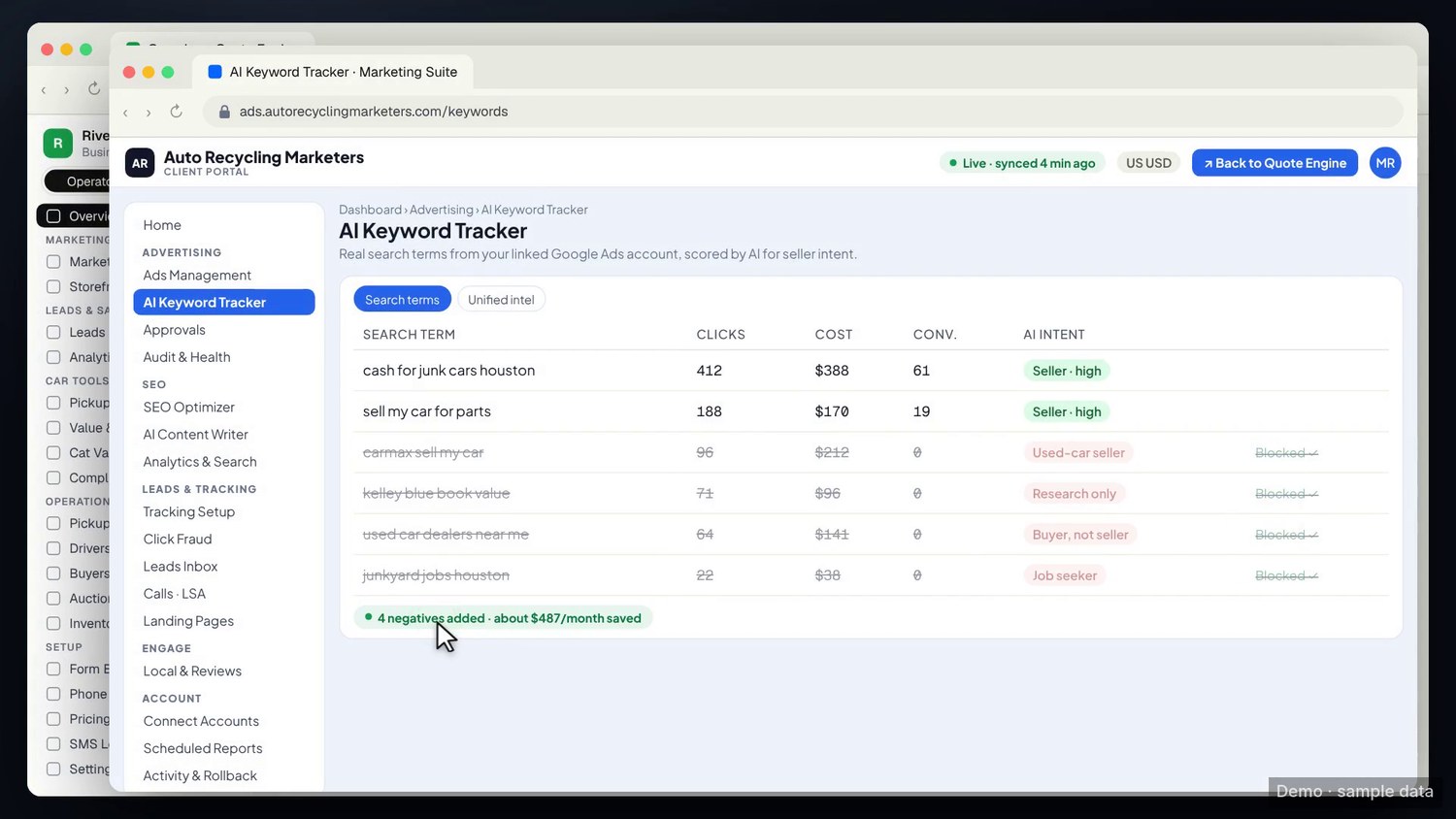
- Negative keywords. The unsung hero of a profitable account. Every search you don't want — "mechanic," "parts," "donate my car," a competitor's name, the next town over — can be excluded. A mature junk-car account has hundreds of negatives, and the search-term report feeds new ones continuously. This is the single biggest source of recovered budget.
- Bidding strategy. You can tell Google to chase clicks, conversions, or a target cost per conversion. Early on, a clicks or manual strategy keeps control while the account gathers conversion data; as that data matures, moving to a conversion-based strategy lets Google's AI bid up on the people most likely to sell you a car. Clean conversion tracking (below) is the prerequisite — without it, automated bidding optimizes toward nothing.
- Targeting — geography, schedule, device. You pay for a seller in your service area at a time you can answer, not a tyre-kicker three provinces away at 3am. Location targeting, ad scheduling and device/location bid adjustments all shape where the budget goes — and the audit engine flags when, say, hundreds of dollars ran after hours while the phone went unanswered.
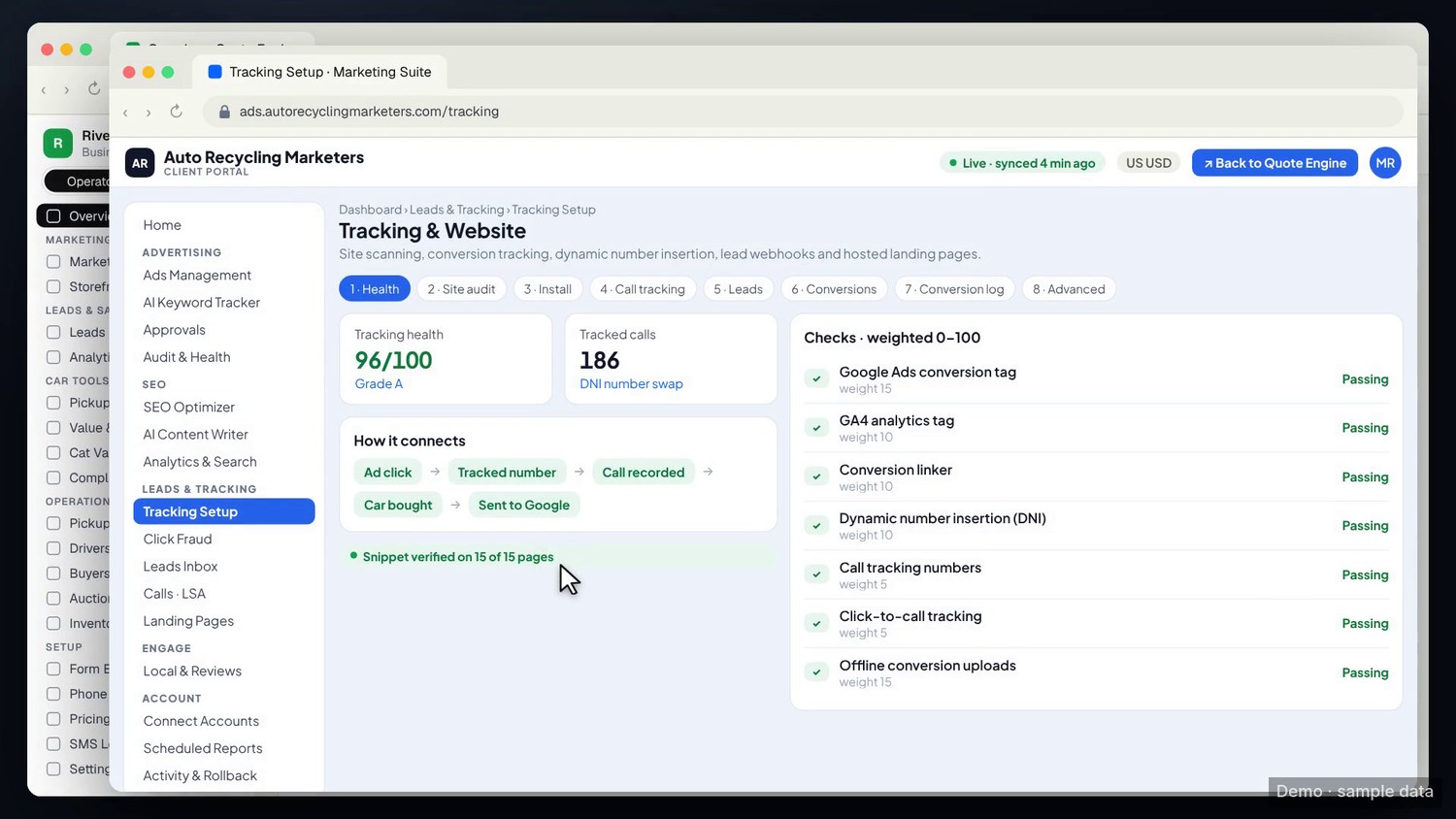
- Conversion tracking — the foundation under all of it. None of the above works without knowing which clicks became leads. The tracking snippet records every form fill and the dynamic-number system records every call, each tied back to its keyword and ad. That's what turns "we spent $2,000" into "this keyword produced nine cars at $140 each" — and it's what a critical alert protects the instant it breaks.
Lowering cost per click and cost per lead — and lifting conversion rate
This is where the system earns its keep, so it's worth being specific about the levers. Your cost per lead is just spend ÷ conversions, so there are only two ways to move it: pay less for each click, or turn more clicks into leads. We work both, every sync.
Paying less per click
- Quality Score. Google discounts advertisers it trusts. Tightly themed ad groups, ad copy that echoes the keyword, and fast, relevant landing pages all raise Quality Score — and a higher Quality Score means a lower cost for the same position. The system continuously flags low-Quality-Score keywords and the specific reason (ad relevance, expected click-through, or landing-page experience).
- Cutting wasted search terms. Broad keywords match to searches you never intended — "free junk removal," "towing near me," "rv recycling." Each one that spends with zero conversions is money gone. The audit engine surfaces every wasteful term with the exact dollars it burned and offers to add it as a negative keyword in one click.
- Reining in broad match. Broad-match keywords that spent real money for nothing get flagged to pause or tighten to phrase match — stopping the unqualified spend while keeping your exact and phrase coverage intact.
- Bidding down the expensive winners. A keyword converting at three times your account average doesn't need to be paused — it needs a 15% bid trim that keeps most of the volume at a far better cost. The system models that and offers the adjustment, reversibly.
Turning more clicks into leads
- Message match. Someone who searched "scrap car recycling" should land on a page about scrap car recycling — not a generic homepage. One keyword-matched landing page per ad group (Part 2.3) is the single biggest conversion-rate lever in paid search.
- Promoting proven search terms. When a search term is quietly converting but isn't a managed keyword yet, the system spots it and offers to add it — so your best-performing real-world phrases get their own bid and clean stats.
- Scaling the winners. When a proven campaign is losing impressions because its budget caps out, the system projects how many extra conversions a 20% budget lift would recover at the current cost, and offers the increase in one click.
- Fixing the plumbing. The nastiest leak is a conversion that stops recording while ads keep spending. That gets flagged as a critical alert the moment it happens — because budget spent unmeasured is budget you can't optimize.
Landing pages built to convert
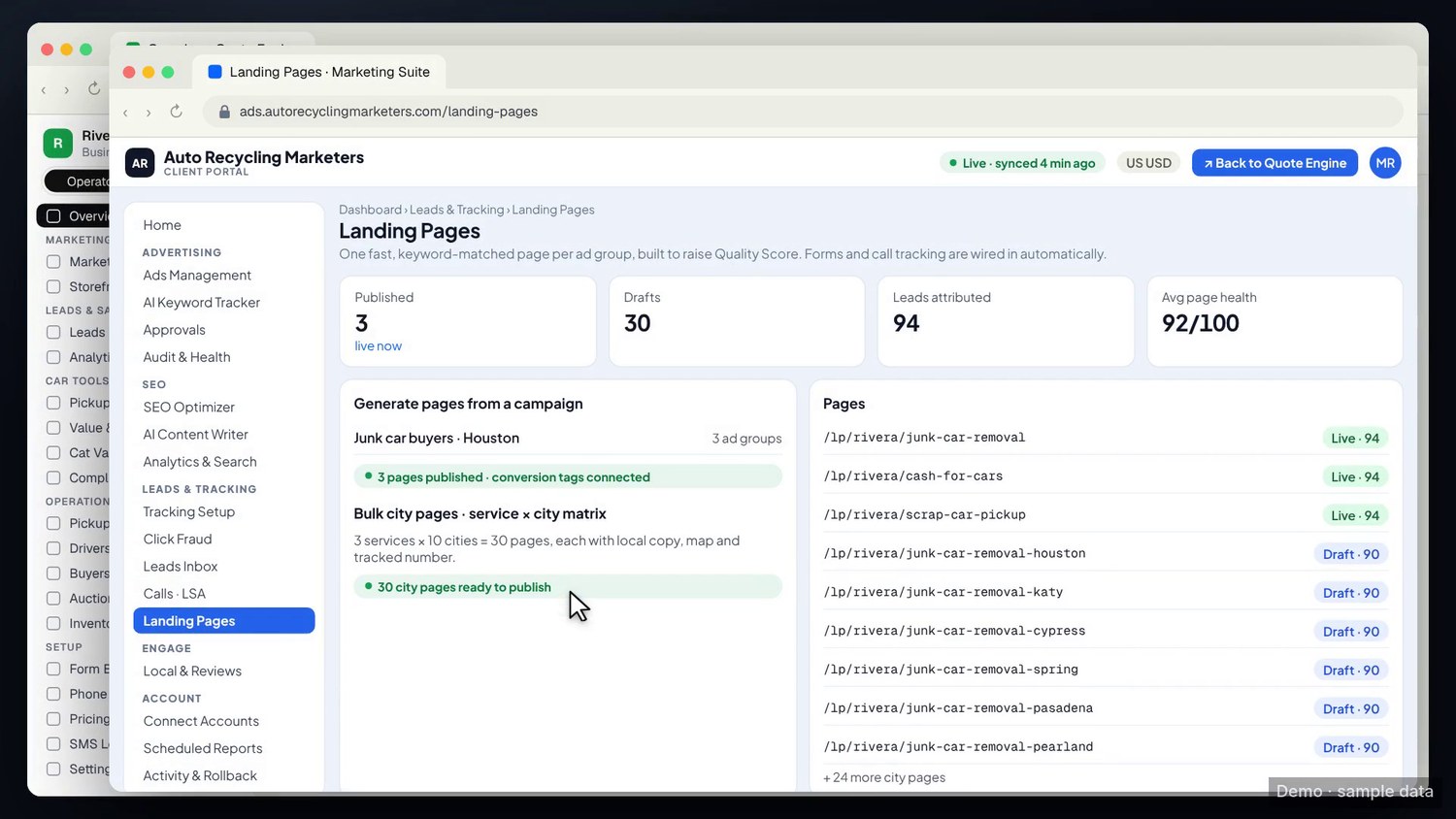
You asked about landing pages specifically, and they deserve their own spotlight, because they're where most of the paid-traffic money is won or lost. Sending ad clicks to your homepage is one of the most common and expensive mistakes in local advertising. The system builds a dedicated page for each ad group instead — one fast, keyword-matched page per theme, built to raise Quality Score and designed around a single action: get the offer, make the call.
- One page per ad group, generated from your campaign. Pick a synced campaign, preview its ad-group themes, and generate a matching page for each — so "junk car removal Calgary" searchers hit a junk-car-removal-Calgary page, not a catch-all.
- Forms and call tracking wired automatically. Every page ships with a lead form and a tracked phone number already connected, and every lead is attributed back to the page and campaign that produced it.
- Your brand, automatically. A brand kit pulls your name, colours, logo and fonts so every generated page looks like you — no design work required.
- Bulk city pages. A service × city matrix spins up location pages ("cash for cars Calgary," "cash for cars Airdrie") at scale for both paid and organic coverage.
- A health score per page grades each page on the things that move Quality Score and conversion, so weak pages are obvious and fixable.
- Published on your own domain. Pages serve from your domain with hosting, SSL and the pages themselves handled for you — one DNS record and you're live.
Ad management and the audit engine — the expertise, built in
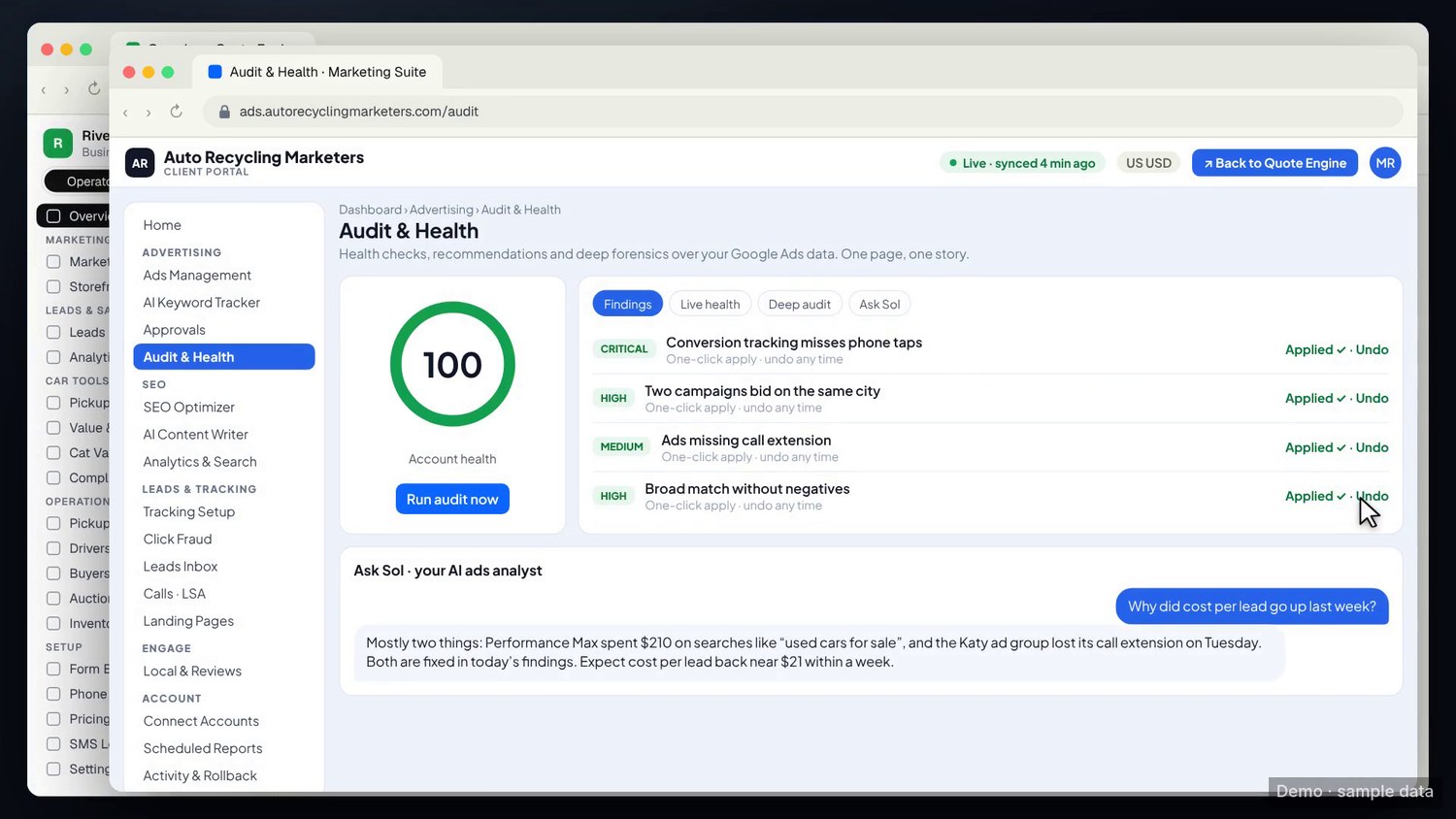
Everything above — the negatives, the bid trims, the winners, the Quality-Score fixes — is driven by an always-on Audit & Health engine that reads your live Google Ads data and turns it into a ranked, plain-English list of what to do next. This is the part that normally lives in an expensive specialist's head. Here it runs continuously, and it shows its work.
The engine grades your account out of 100 and sorts every finding by severity — critical, high, medium, low — across keywords, search terms, ads, extensions, budgets and landing pages. A few of the finding types it raises:
- Wasteful search terms → add as a negative keyword (with the exact spend wasted).
- Broad-match risk → pause or tighten a keyword that's expanding to junk queries.
- High-CPA keyword → trim the bid by a modelled amount to cut cost while keeping volume.
- Scale a winner → raise a capped budget with a projected conversion gain.
- Keyword cannibalization → stop a keyword competing against itself across ad groups.
- Add a converting search term → promote a real-world phrase that's already producing leads.
- Low Quality Score → the specific relevance, click-through or landing-page cause to fix.
- After-hours spend → money spent while no one's answering the phone.
- RSA coverage → ad groups that need another responsive search ad, with AI-drafted copy grounded in your own keywords and business.
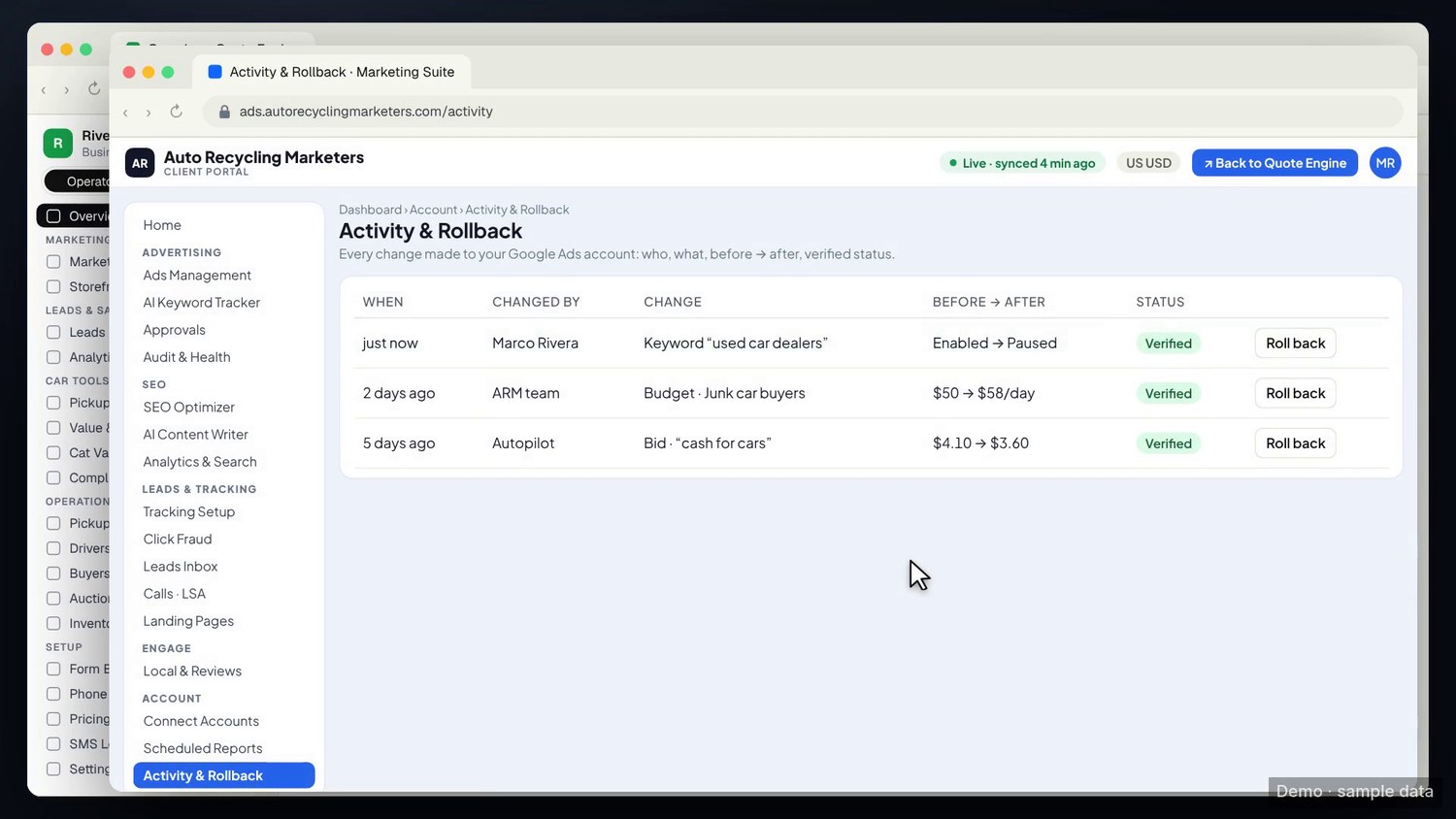
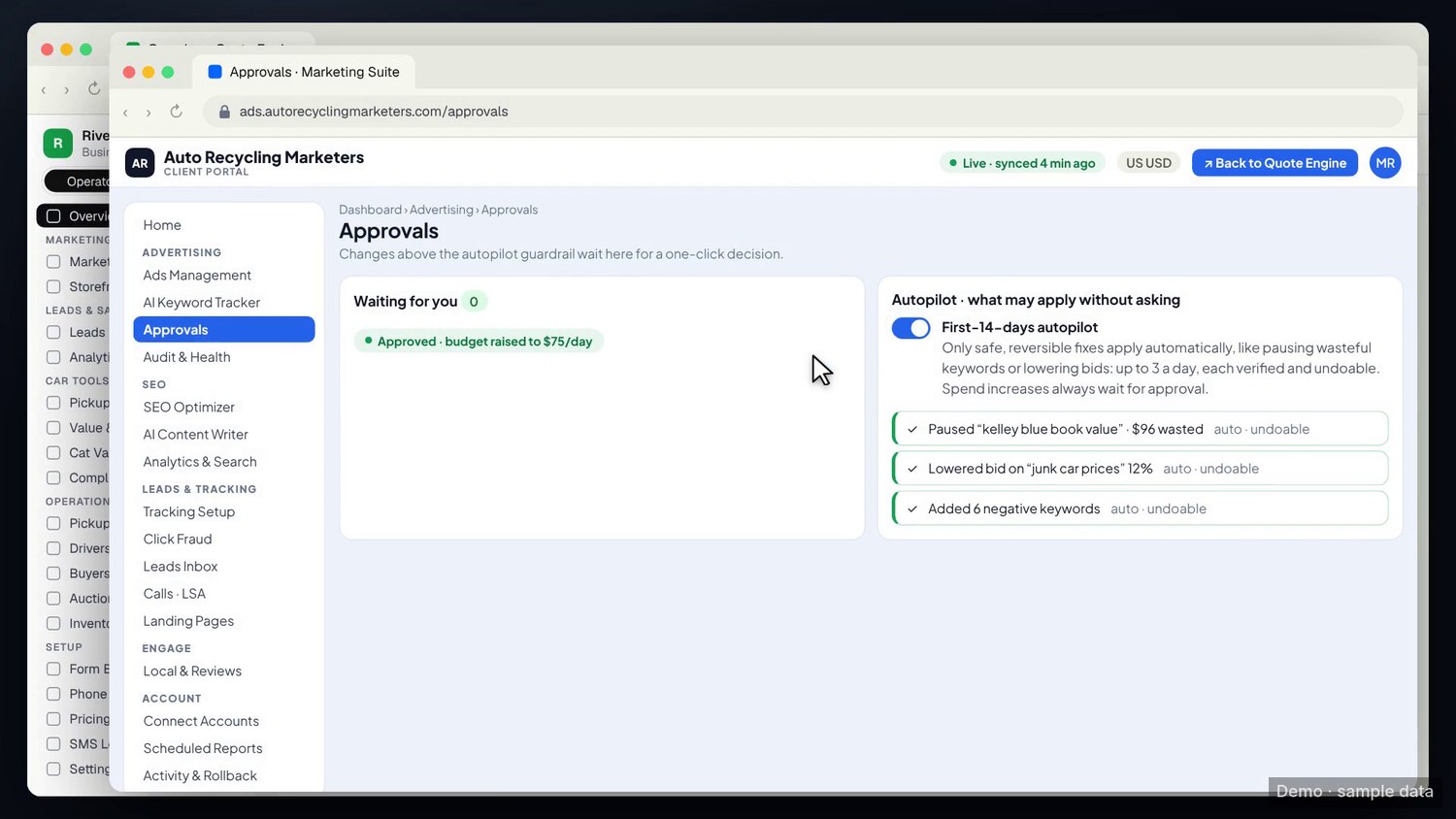
Two things make this safe to act on. First, every change is previewed, verified against Google, and reversible — one-click Apply, one-click Undo that restores the exact previous bid or budget. Nothing changes your account silently. Second, the riskier actions (creating keywords, raising budgets) are gated behind explicit approval, so you — or your account manager — stay in control. There's also "Ask Sol," an AI you can ask about the account in plain English, and a deeper AI forensics audit for a narrative read on the whole thing.
A worked example — what "optimization" actually looks like
To make this concrete, here's the kind of pattern the engine surfaces on a real junk-car account in a single sync. The search-terms report shows that "cash for cars" and "junk cars for cash" are quietly converting at well below the account's average cost — but they're only matching through broad keywords, so they have no clean stats and no bid control. At the same time, "junk car removal," "pick up junk car," "rv recycling" and a dozen other terms have spent real money with zero conversions. And one proven campaign is losing a quarter of its impressions because its daily budget caps out before the day is done.
Left alone, that account slowly bleeds. Worked through the engine, the same account gets: the proven converters promoted to exact-match keywords with their own bids; the dead terms added as negatives so they stop spending; a high-cost keyword bid down 15% to trim its cost without losing the volume; and the capped winner's budget raised 20% to recover the lost impressions — with a projection of roughly how many extra conversions that recovers. None of it is a guess, every step is reversible, and the net effect is the same budget producing more cars at a lower cost per car. That is the entire game, run continuously.
The rest of the control room
The audit engine is the headline, but a working Google Ads operation needs more than a to-do list. The platform wraps the whole account in supporting tools:
- AI Keyword Tracker & Search-Term History. The keyword tracker watches your managed keywords and surfaces new winners; the search-term history keeps a running record of what people actually typed to reach you — the raw material for both new keywords and new negatives, preserved over time instead of lost to Google's short reporting windows.
- The change pipeline — preview → verify → apply → undo. Every change the system makes to your live account goes through the same disciplined path: it's previewed so you see exactly what will happen, executed, then verified against Google to confirm it took, and logged with a one-click undo that restores the exact previous state. The riskier moves — creating keywords, raising budgets — sit behind an explicit Approvals queue so nothing spend-increasing happens without a human yes.
- Budget pacing & auto-pace. Set a monthly budget target and the system shows month-to-date pacing and a projected month-end spend, with optional auto-pacing so you never blow through budget early or leave it unspent — your account manager sets the target and the guardrails.
- Account Health & transparency. A single health score summarizes connection status, data freshness, tracking health and open findings, so you always know whether the numbers you're looking at are current and trustworthy. The platform even shows its own Google Ads API usage for the day — unusual honesty about what it's doing under the hood.
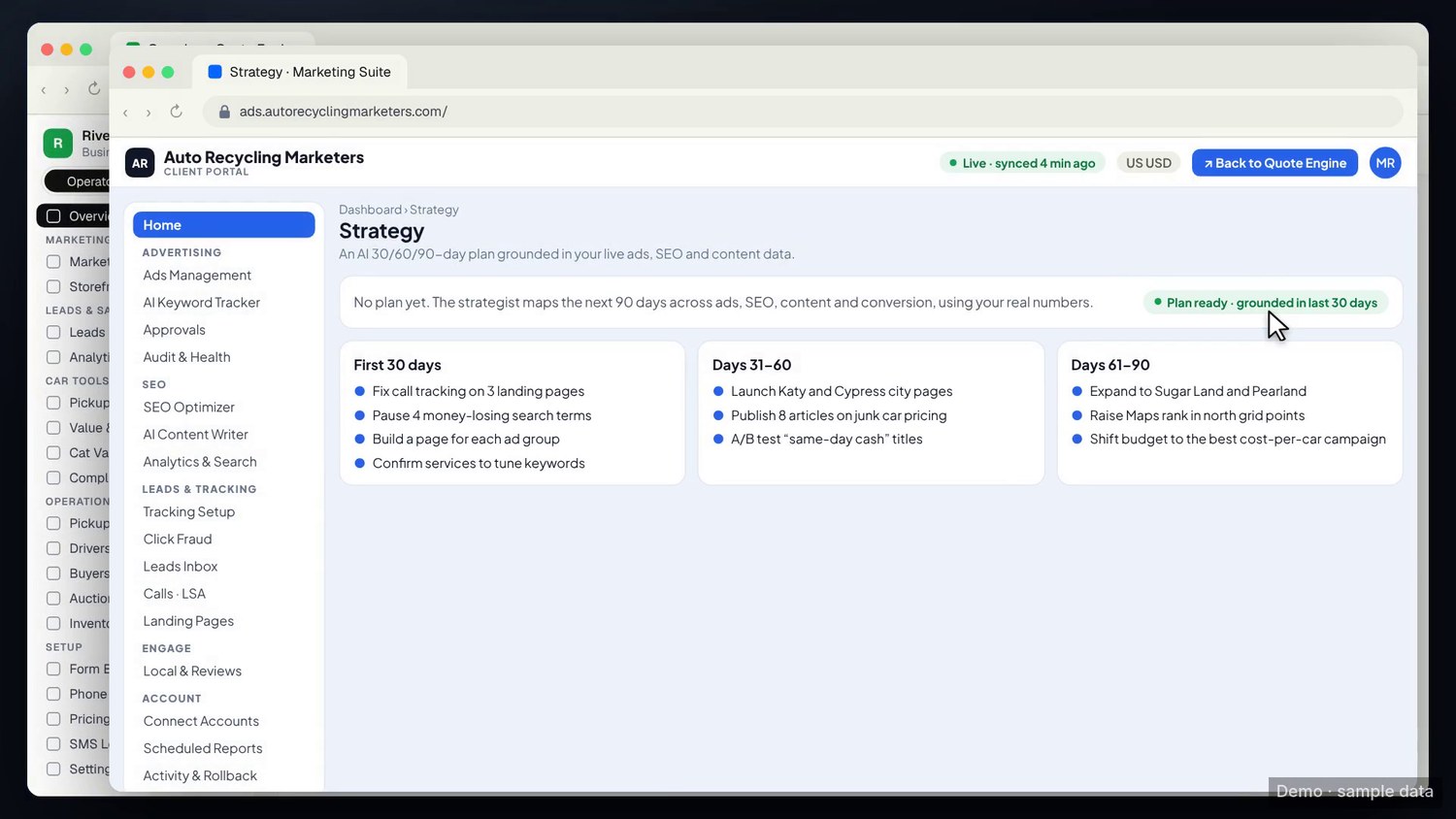
- The 30/60/90-day AI strategy plan. On demand, an AI strategist reads your live ads, SEO and content data and maps the next 90 days across all of it — every recommended action grounded in your real numbers, not a generic template. It turns "what should we do next quarter" into a concrete, sequenced plan.
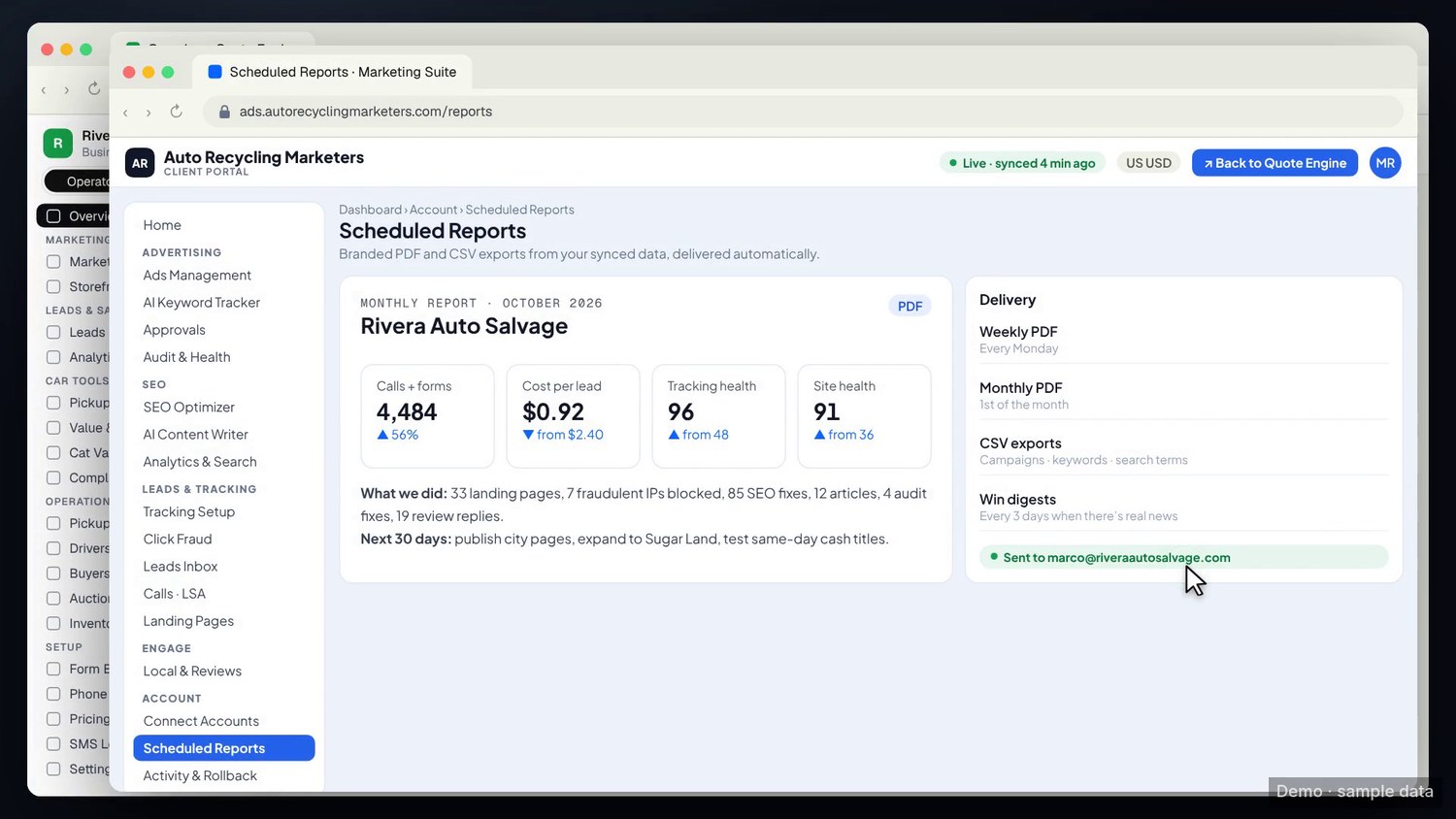
- Branded client reports. Weekly and monthly PDF reports plus CSV exports (campaigns, keywords, search terms) are generated from your synced data and carry your branding — so the results are easy to show, whether to yourself, a partner or an investor.
- "Ask Sol." An AI assistant you can ask anything about the account in plain English — "why did my cost per lead go up last week?" — and get an answer that cites your actual figures.
Click-fraud protection — ClickGuard
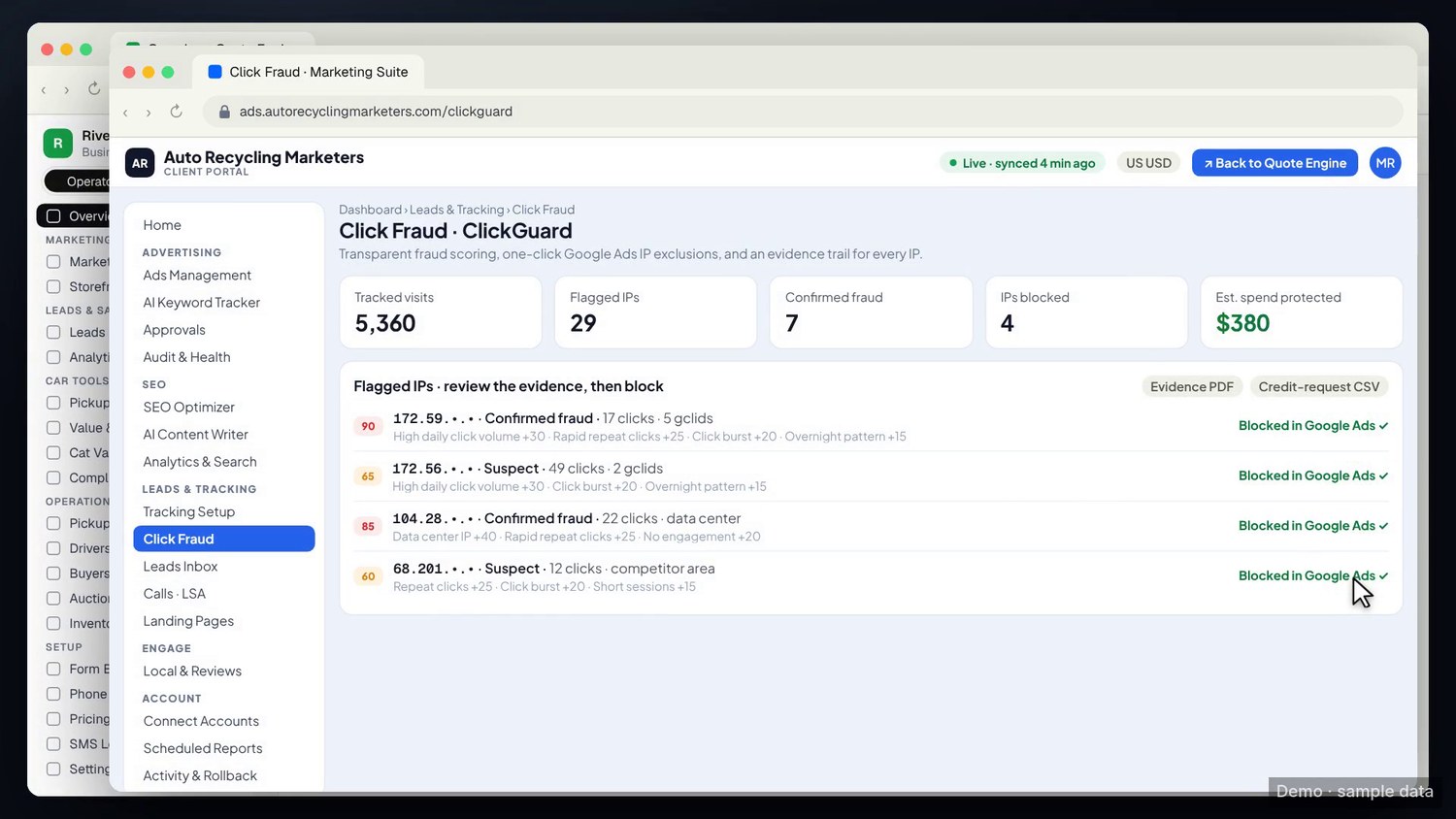
A real cost in paid search that nobody likes to talk about: not every click is a human. Competitors, bots and click farms can drain a local budget on clicks that never had a chance of becoming a car. ClickGuard watches for it.
- Transparent fraud scoring. Each suspicious IP gets a score and an evidence trail you can actually read — not a black box.
- One-click IP exclusions. Confirmed bad actors are blocked in your Google Ads account with a click, and unblocked just as easily.
- Evidence you can bank. Dated credit-request (CSV) and evidence-summary (PDF) exports give you what you need to request credits back from Google.
- A running tally of spend protected — blocked clicks times your average cost — so you can see what it's saving.
Call tracking and LSA lead disputes
In this business a huge share of leads are phone calls, not forms — so calls have to be tracked and protected like everything else. Two pieces handle it.
Dynamic number tracking swaps the phone number shown on your landing pages per traffic source, so a call can be tied back to the ad or keyword that produced it — the same attribution you get on form leads, applied to the phone.
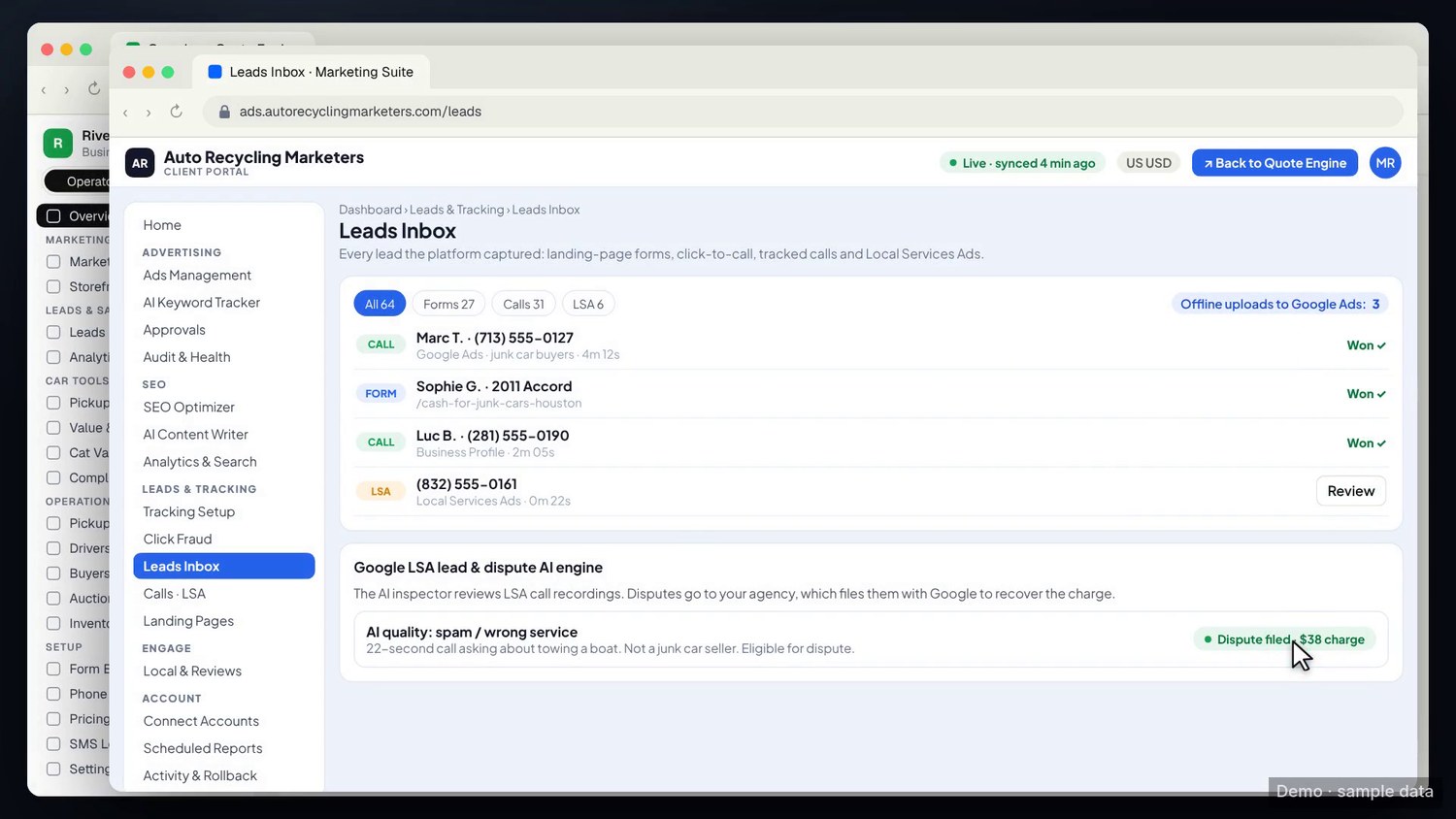
And for operators running Google's Local Services Ads (the "Google Guaranteed" calls at the very top of local results), there's an AI dispute engine: an OpenAI-powered inspector reviews LSA call transcripts on demand, and when a call was a bad lead — wrong area, spam, not a real job — a dispute request goes to your agency, which files it with Google to recover the charge. It tracks disputes filed and the dollars credited back to your LSA balance.
The lead inbox and alerts — where it all lands
All of this traffic — form fills, tracked calls, quote-engine submissions — flows into one place. The Leads Inbox is a single, attributed list of everyone who raised their hand, each tagged with the campaign, keyword or page that produced them. Lead Alerts push the new ones to you in real time so you can respond while the seller is still deciding, and Scheduled Reports send branded weekly and monthly PDFs (plus CSV exports) so the whole picture arrives in your inbox without anyone opening the dashboard.
That lead inbox is also the bridge to the second half of the system. A lead is only worth something if you close it — and that's the Quote Engine's job. But first, the two slower, cheaper traffic engines that feed the same machine: SEO and your Google Business Profile.
Part 3SEO & organic traffic
Paid ads are a tap you turn on and off. SEO is a well you dig once and draw from for years. The two work best together — ads for immediate volume, SEO for the free, compounding traffic that lowers your blended cost per lead over time.
Every time someone searches "sell my car for cash" and clicks a result you didn't pay for, that's a lead at zero marginal cost. The goal of SEO is to earn more and more of those clicks — to rank for the searches your buyers actually make and keep ranking as the months go by. Our SEO Optimizer does it with an approach built for busy operators: it finds what's holding your site back in Google and fixes most of it in one click.
Here's what the engine covers, grouped the way it's organized:
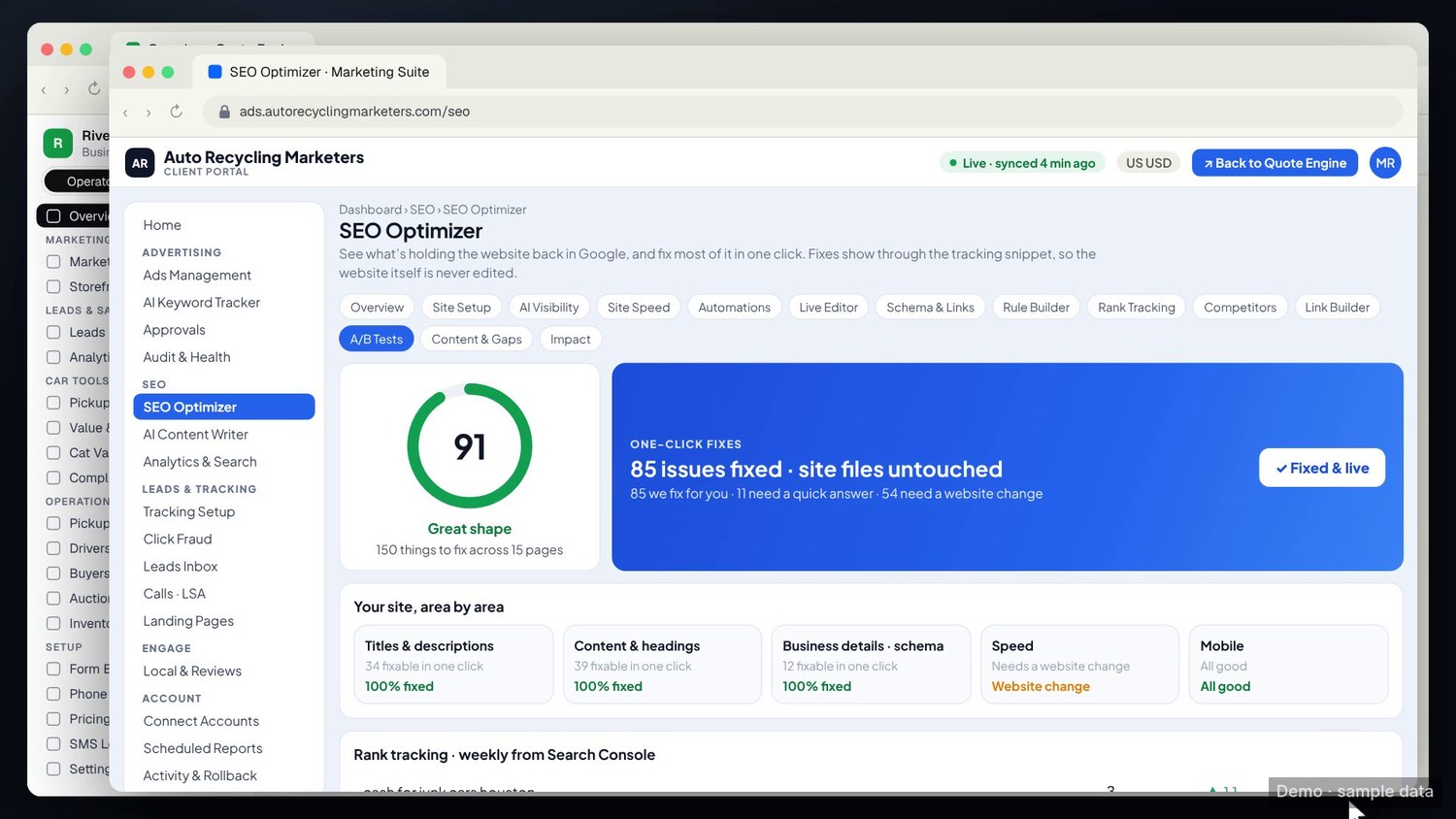
- Health. A full-site scan (up to 2,000 pages) produces a health score and a ranked list of issues. A real-browser site-speed check measures how fast each page actually loads, and an AI page-health review reads each page the way a search engine would. There's also an AI Visibility view — how your business shows up in AI answers and assistants, not just classic search, which is quickly becoming its own channel.
- Fix. One-click automations for common issues; AI-generated titles & descriptions that lift click-through from the results page; a live editor and schema & links tools for structured data and internal linking; a rule builder for site-wide fixes — all applied through the snippet, all reversible, all logged in a history you can roll back.
- Grow. Rank tracking for the keywords you care about, competitor monitoring, a link builder, A/B tests, and a content & gaps tool that finds the topics you should be publishing but aren't.
- Results. An impact view tying SEO work to ranking and traffic movement, plus alerts and reports so wins are visible.
How the one-click fixes work
Classic SEO means a developer editing title tags, meta descriptions, heading structure, schema markup and internal links across dozens of pages — slow, expensive, and risky on a live site. Here the scan finds the issues and the snippet applies the fixes at render time: when a visitor (or Google) loads the page, the corrected title, description, schema or link is injected on the way out. Your source files are never touched, so there's nothing to break and nothing to deploy, and a full history with rollback means any change can be reversed to the exact prior state. It makes genuine technical SEO safe to turn on even for an operator who's nervous about their website.
Ranking in classic search — and in AI answers
Two of the tools deserve a closer look because they're where the leverage is:
- Titles & descriptions. The single highest-return SEO fix for a local business is usually the snippet that shows in Google's results — the clickable blue title and the grey description under it. AI-generated, keyword-aware titles and descriptions lift click-through from the results page, which means more organic traffic from rankings you already hold, before you've moved a single position.
- AI Visibility. Increasingly, sellers don't scroll a page of blue links — they ask an AI assistant "who buys junk cars near me?" and act on the answer. The AI Visibility view tracks how your business shows up in those AI answers, not just classic search, so you can start earning the channel that's quietly eating traditional search traffic.
Around those sit the growth tools: rank tracking for the keywords that matter, competitor monitoring to see who's moving and why, a link builder for the authority signals Google rewards, A/B tests to prove what actually lifts conversions, and a content & gaps tool that finds the valuable topics your competitors rank for and you don't — turning "what should we write about" into a prioritized list. An Impact view then ties the work back to real ranking and traffic movement, so SEO stops being an act of faith and becomes a measured channel like paid.
Every tool in the SEO suite, and what it does for you
This is a full search platform, not a plugin, so it's worth walking the whole toolbox. It's organized in four stages — diagnose the site's health, fix what's broken, grow what's working, and prove the results — and here is each tool in plain terms.
Health — find out exactly what's holding you back
- Full-site scan & health score. The engine crawls up to 2,000 pages of your site, grades its overall health out of 100, and produces a ranked list of every issue it finds — broken links, missing titles, thin content, slow pages, bad redirects, orphaned pages. You get one screen that says, in order, exactly what's costing you rankings.
- Site Setup. The foundational checks — that search engines can actually crawl and index you, that your sitemap and robots rules are right, that the tracking snippet is installed and verified. Get these wrong and nothing else matters, because Google can't see you properly in the first place.
- Site Speed & Core Web Vitals. Page speed is a confirmed ranking factor and a conversion factor — a slow page both ranks lower and loses the visitor you paid for. The engine measures how fast each page actually loads in a real browser (not a lab estimate) and flags the specific pages dragging you down.
- AI Page Health. Beyond the mechanical checks, an AI reviews each page the way a search engine evaluates quality — is the content relevant, complete, and clearly about what it claims to be about? It's the difference between "technically valid" and "actually good."
- AI Visibility. The newest and fastest-moving channel: more sellers now ask an AI assistant "who buys junk cars near me?" instead of scrolling blue links. This view tracks whether your business shows up in those AI answers, so you can start winning the searches that never touch a traditional results page.
Fix — repair it without touching your website
- Automations. The common, repetitive issues — missing or duplicate titles, absent meta descriptions, broken internal links, missing alt text, redirect problems — are fixed in bulk with one click, applied through your snippet at render time rather than by editing your files.
- Titles & Descriptions. The highest-return fix for most local businesses, because the title and description are what people actually click in the results. AI-generated, keyword-aware titles and descriptions lift click-through on rankings you already hold — more traffic before you've moved a single position.
- Schema & Links. Structured data (schema markup) is how you earn the rich results — star ratings, FAQs, business details — that make your listing bigger and more clickable, and it's how AI systems understand your business. The engine adds the right schema types and manages internal linking so authority flows to your most important pages.
- Live Editor. For hands-on changes, edit a page's on-page SEO directly and see it applied through the snippet — no developer, no deploy.
- Rule Builder. Define a rule once — "add this schema to every city page," "rewrite titles in this pattern across the blog" — and apply it site-wide, so fixes scale across hundreds of pages instead of one at a time.
- History & rollback. Every change is logged and reversible to the exact prior state. Because nothing is written to your actual site, turning SEO on — and off — is completely safe.
Grow — earn more rankings and more traffic
- Rank Tracking. Track your position for the keywords that matter — "cash for cars [city]," "scrap my car," "junk car removal near me" — over time, so you can see progress move and catch drops early. For a local business this is tied to the geo-grid view, which shows your rank across your whole service area rather than a single national number.
- Competitors. See who's ranking above you, what they're ranking for, and what changed — so you can target the specific gaps where you can realistically overtake them instead of guessing.
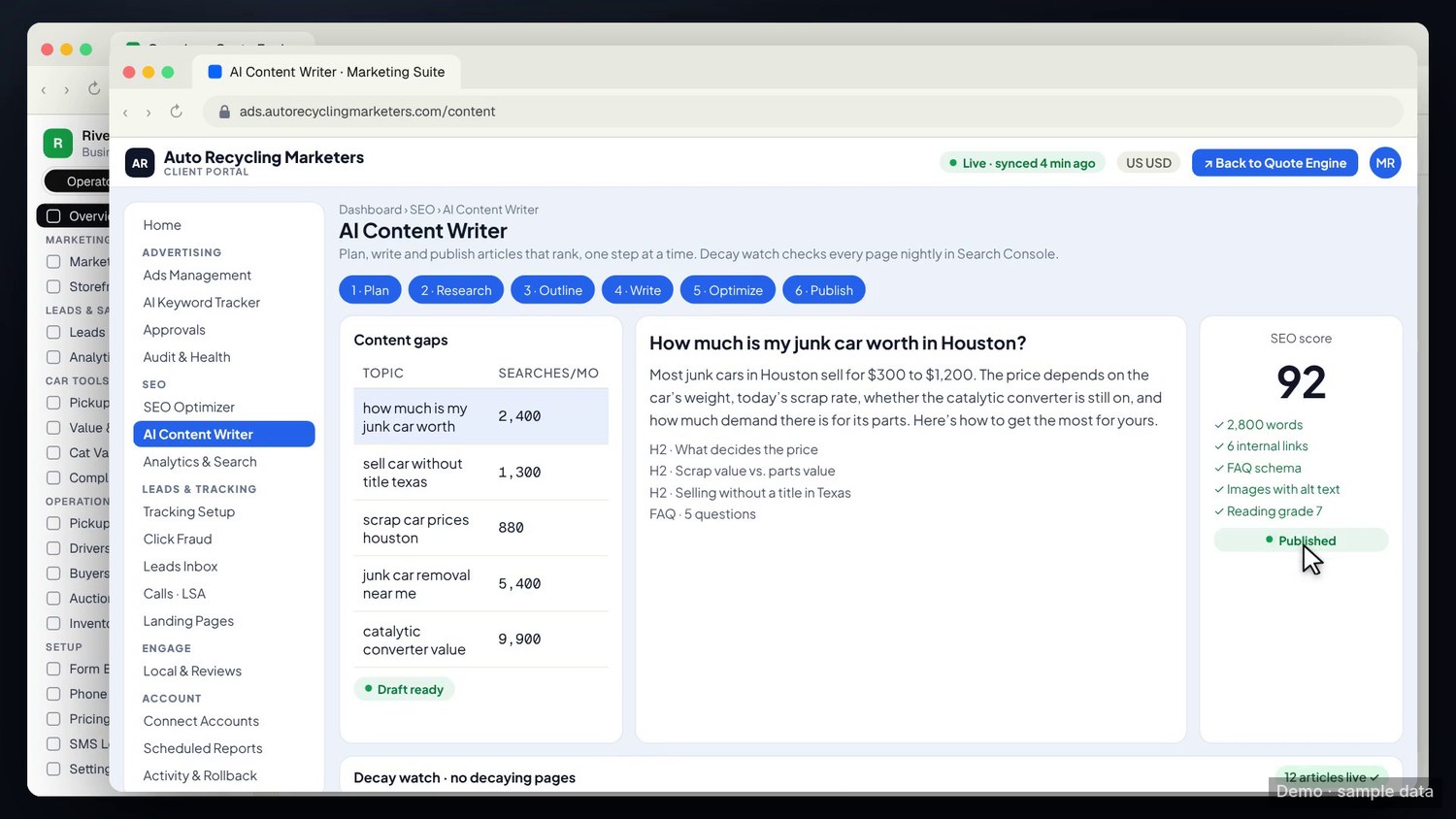
- Content & Gaps. This is where new organic traffic comes from. The tool finds the valuable, high-intent topics your competitors rank for and you don't — the exact articles and pages you're missing — and turns "what should we publish?" into a prioritized list tied to real search demand.
- Link Builder. Backlinks remain one of the strongest authority signals. The link builder helps you earn the local and relevant links that lift your whole domain's ability to rank.
- A/B Tests. Prove what actually works. Test a title, a page layout or a piece of copy against the old version and keep the winner on evidence, not opinion — the same discipline the ads side applies to conversion.
Results — prove it's working
- Impact. Ties the SEO work back to real ranking and traffic movement, so the channel is measured, not taken on faith. You can see which fixes moved which pages.
- Alerts. Get told the moment something important changes — a ranking drop, a site error, a page that fell out of the index — so problems are caught in days, not discovered months later.
- Reports. Branded reports that show the wins clearly, the same way the ads side reports, so progress is easy to see and easy to show.
Content is the other half of organic. The same platform includes an AI article writer and the bulk city-page builder from Part 2 — so you can publish genuinely useful, locally-targeted articles and location pages that rank for long-tail searches ("how much is my catalytic converter worth," "cash for cars in [your city]") and feed the same lead inbox. Over a few months, that library becomes a standing source of free leads that keeps producing long after the writing is done.
Part 4Google Business Profile & the map pack
For a local junk-car buyer, the three results in the Google Map pack — the little map with three businesses under it — are some of the most valuable real estate on the internet. People searching "junk car buyer near me" call straight from that map. Getting into those three spots, and getting the reviews that keep you there, is its own discipline.
Your Google Business Profile (the listing that shows your business on Google Maps and in local search) is managed from the same system, and it's fed by a single Business Profile hub — one source of truth for your name, phone, hours, service areas, services and trust signals. Edit it once and every landing page, article and your Local Services profile all read from it, so your details are consistent everywhere Google looks — and consistency is itself a ranking signal.
Three levers move local rankings, and legitimate work on each is what we focus on:
- Relevance. The right primary and secondary business categories, complete services and attributes, regular Google Posts and real photos, and a website whose content and local schema match what you do. This is the profile-optimization work the hub is built to keep accurate.
- Distance. Clearly defined service areas and the real cities you cover — named explicitly on your pages, never left as "your area" — so Google understands where you operate.
- Prominence. This is where reviews live. Review quantity, how recently they arrived, the sentiment and keywords in them, and your response rate all feed local rank — alongside consistent name/address/phone citations across directories and local links.
What goes into a top-3 profile
Getting into the map pack isn't one big move; it's a stack of signals done consistently. The work breaks down into a handful of levers, each of which we manage the legitimate way:
- Categories & services. The right primary category (and the right secondary ones) is one of the strongest relevance signals there is — "auto wrecker" vs "towing service" vs "recycling center" changes which searches you can even appear in. A complete services list and accurate attributes extend that reach.
- Reviews — quantity, recency, velocity. It's not just how many reviews you have; it's that fresh ones keep arriving. A steady drip of recent reviews signals an active, trusted business, while a profile that stopped collecting them a year ago goes stale. Keyword-rich reviews ("they gave me cash for my junk car same day") reinforce relevance too.
- Citations & NAP consistency. Your name, address and phone, identical across dozens of directories (Yelp, YP, BBB, industry listings and more), tells Google your business is real and where it is. Inconsistent listings — an old address here, a different phone there — quietly suppress rankings. Citation building and cleanup is grinding work that pays off.
- Posts & photos. Regular Google Posts and real, recent photos keep the profile active and give Google fresh content to associate with your services and area.
- Q&A and response rate. Answered questions and promptly answered reviews both signal an engaged operator — and a fast response rate is itself a ranking input.
- On-page & local links. Your website's content, local schema, an embedded map and genuine city pages reinforce where you operate; links from local sources (news, chambers, directories) build the prominence that holds a ranking.
Done together and kept up, these are what move you into the three results that get the calls — and, just as important, what keep you there once you arrive.
Reviews & reputation
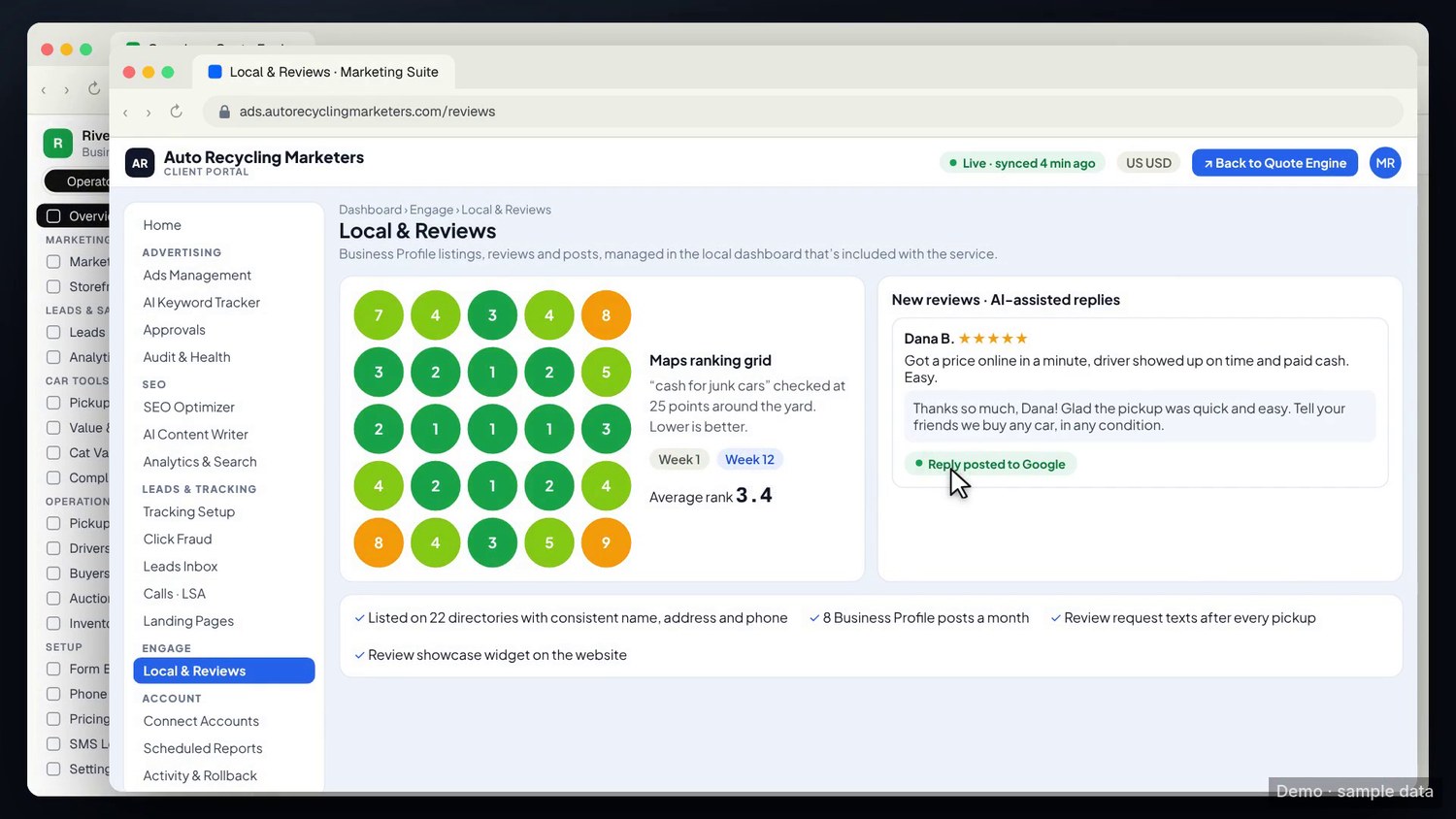
Because reviews are the single biggest prominence lever, the system includes a full reputation toolkit: review requests sent by SMS, email, WhatsApp or QR code; automated follow-up campaigns; a dashboard that pulls reviews from 20+ platforms (Google, Facebook, Yelp, Trustpilot, BBB and more) into one place; AI-drafted responses; and widgets to display your best reviews on your site and share them to social. More real reviews, arriving steadily and answered promptly, is the cleanest way to climb the map pack and win the calls that come from it.
One detail worth calling out, because it protects your rating: review requests go out through a landing page that routes satisfied customers to leave a public Google review and sends an unhappy customer to you privately first — so you catch and fix problems before they become one-star posts, while your happy majority builds the public rating that moves the map. Requests can go by SMS, email, WhatsApp or QR code, and the whole thing runs on automated campaigns so it keeps working without anyone remembering to ask.
Progress is tracked with a geo-grid scan — a map of your service area that shows your average rank at dozens of points, and your Share of Local Voice: the percentage of those points where you land in the top three, before and after the work. So "are we ranking better?" has a real, visual, defensible answer instead of a guess — a heatmap that turns red to green as the work lands.
The Business Profile hub, in depth
Because every page, article and your map listing all read from the one Business Profile, it does more than store your details — it enforces honesty and consistency across everything. A completeness meter shows how filled-out your profile is and what's still worth adding. Trust claims are render-gated: a page will never say "licensed & insured" or show a star rating unless you've actually entered it, so your marketing can't accidentally overstate. Your real service-area cities appear on pages by name — never a vague "your area." And the hub feeds your Local Services profile too, and links your services to your ad keywords, so a service you turn off even becomes a negative keyword automatically. Edit once; the whole system stays accurate and in sync.
Part 5The hand-off — where traffic meets the Quote Engine
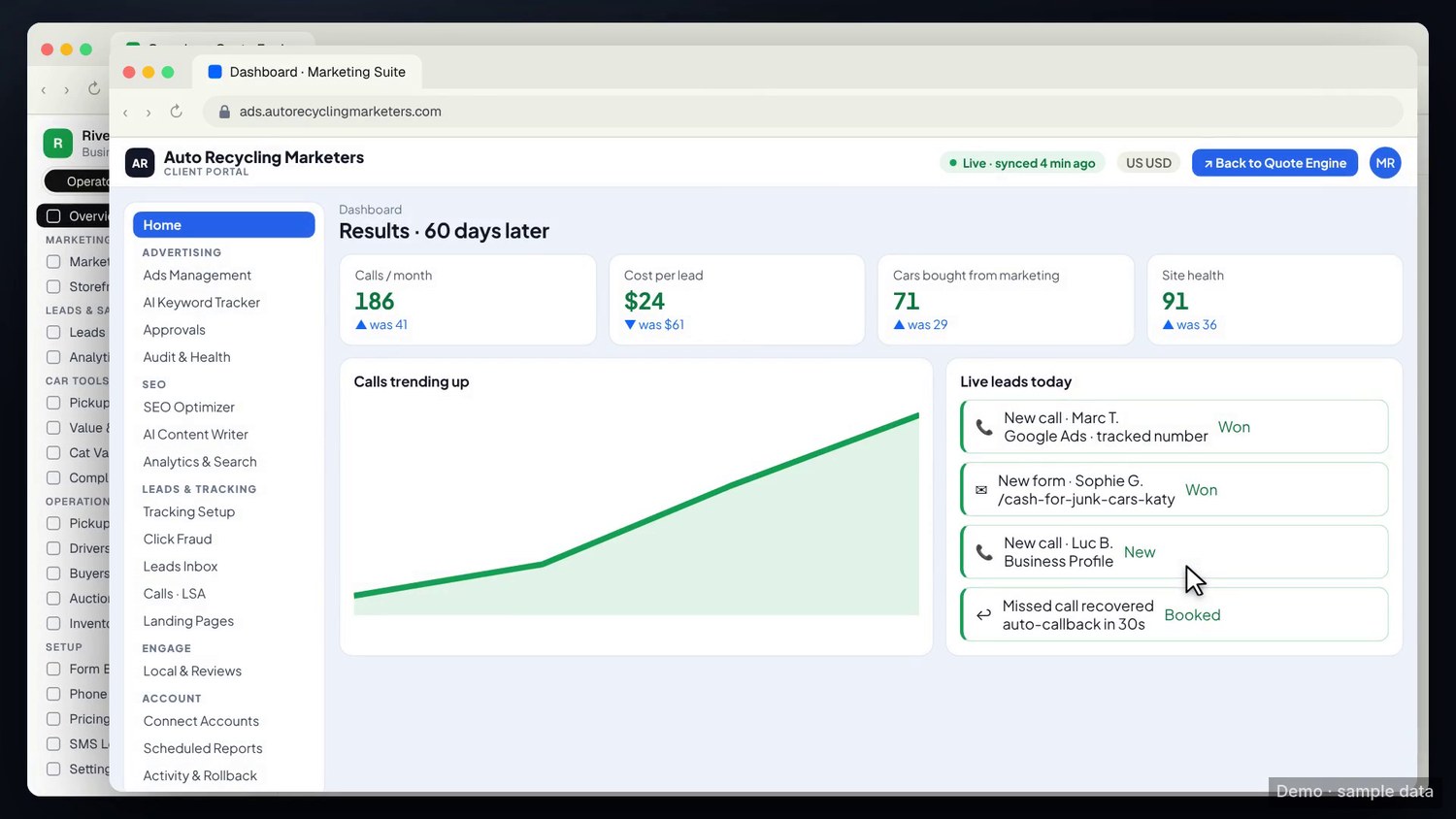
Everything so far has one job: get a motivated car seller to raise their hand. Ads, SEO and the map pack are the top of the funnel. But traffic that doesn't convert is just an expensive way to lose. This is the seam where most competitors stop — and where our system is only halfway done.
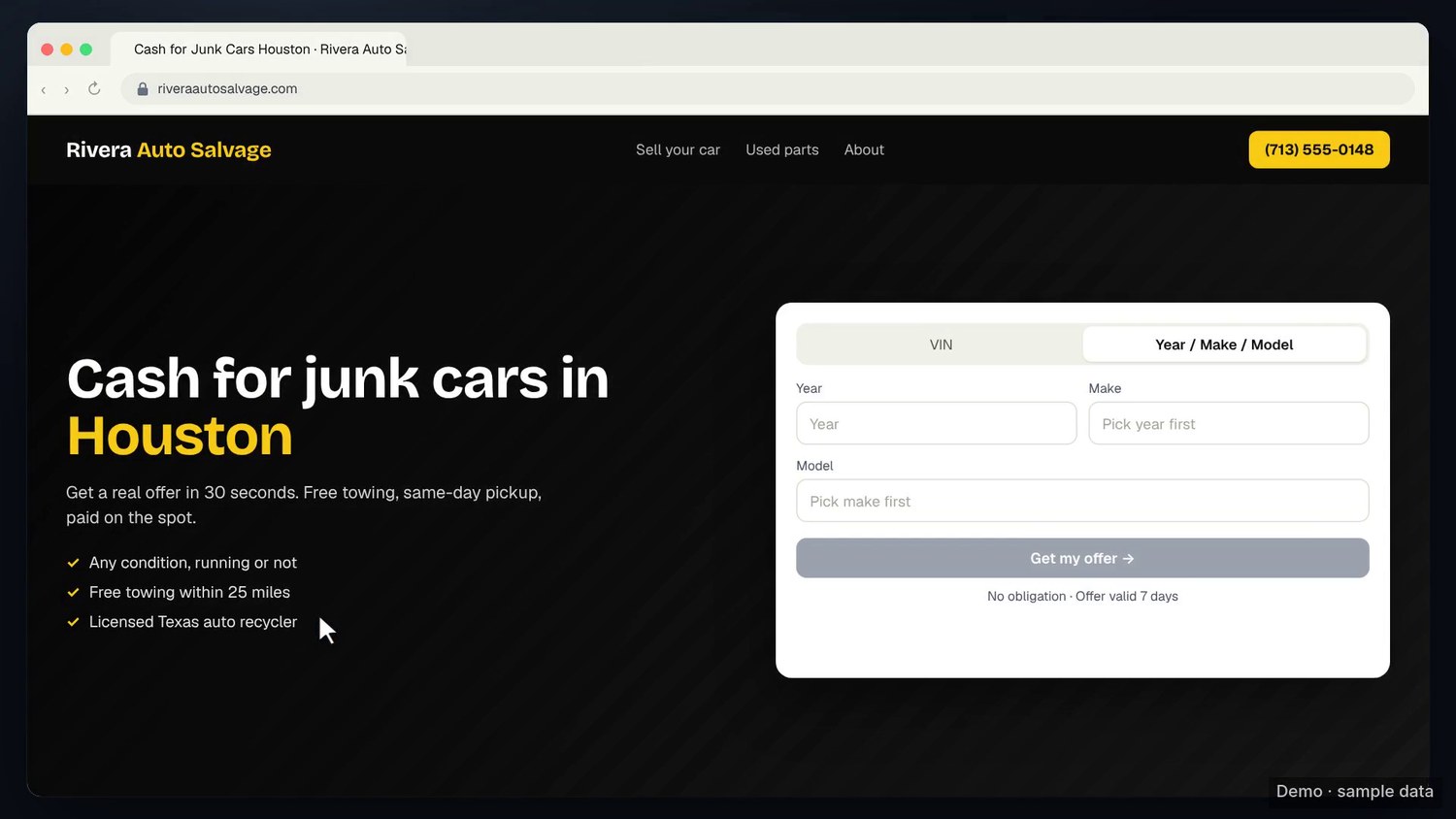
Picture the moment. A seller in your city searches "junk car buyer," clicks your map listing or your ad, and lands on a fast page that names their city and their car. Now what? On a typical junk-car website, they're asked to "call for a quote" or fill a form that disappears into an inbox — and most of them leave, because they wanted a number now and you made them wait.
That handoff is exactly what the Quote Engine fixes. Instead of a dead form, the same visitor gets a real, instant cash offer in about 30 seconds — and in giving it, hands you their car details, their photos, and their contact information. The marketing delivered the person; the Quote Engine turns that person into a named, qualified, closeable lead and starts working to book the car. The two halves are built to lock together: leads are attributed end-to-end, so you can finally see which keyword, ad or page didn't just make a click — it made a car.
Part 6The Quote Engine, feature by feature
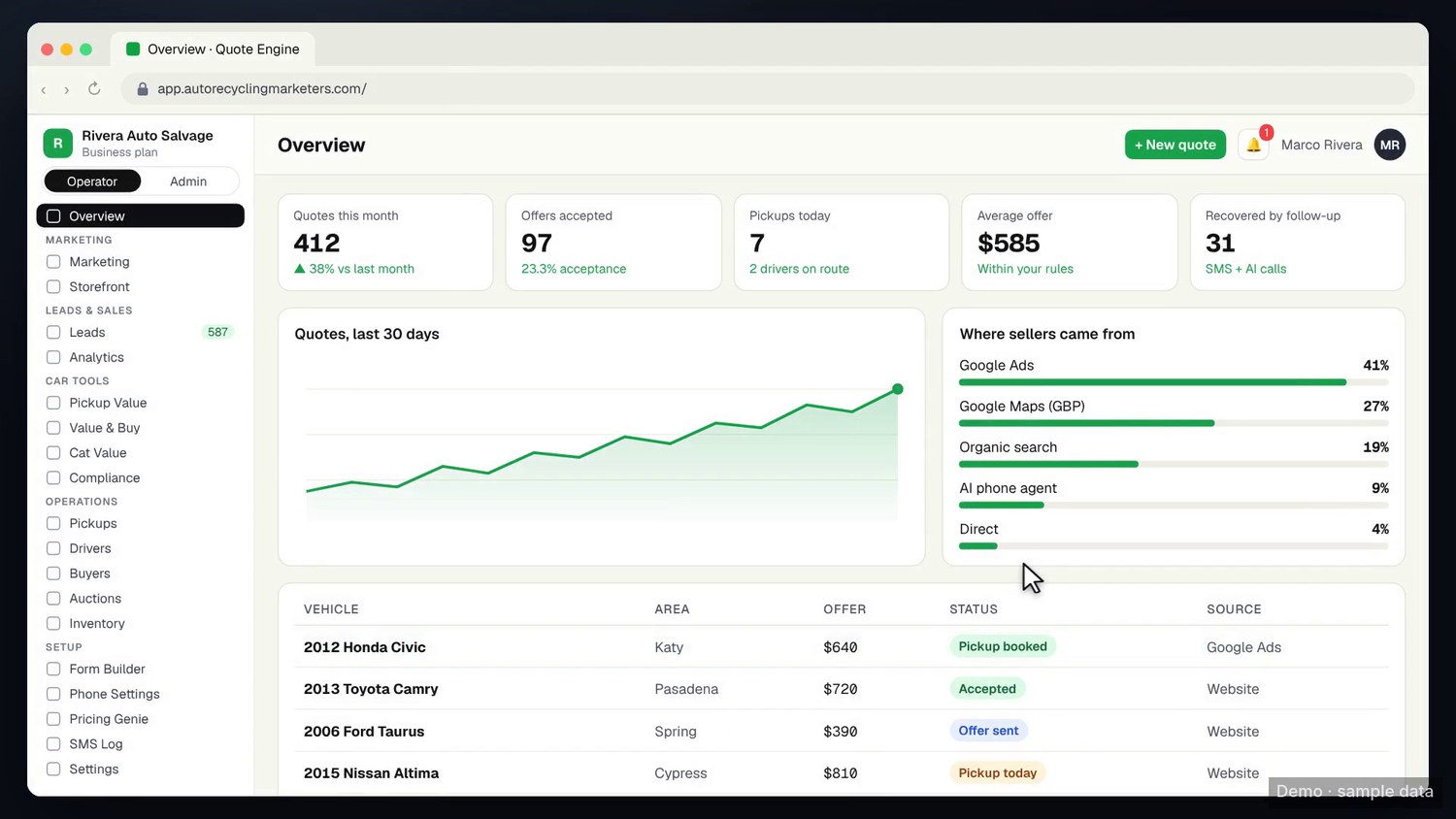
The Quote Engine is the close. It's the part the car seller actually touches, and it's the system you run your buying operation on — from the first instant offer all the way to a signed bill of sale and a paid pickup. Here's every piece, split into what the seller experiences and what you operate.
It's worth being blunt about why this half matters as much as the marketing. Driving traffic is expensive; a wasted lead is wasted ad spend. If two operators spend the same on ads but one closes 30% of leads and the other closes 15%, the first one is effectively buying cars at half the price — without changing a dollar of budget. Every feature below exists to lift that close rate: respond instantly, never miss a call, follow up relentlessly, price accurately, and make the paperwork and pickup frictionless. This is where marketing spend turns into margin.
What the seller experiences
Instant cash offer the core
A seller answers a few simple questions about their car — or just enters a VIN — and gets a real cash offer in about 30 seconds. No "we'll call you back," no waiting. That instant number is the hook that converts a curious visitor into a committed lead, and it's the single biggest reason pages with the Quote Engine out-convert a plain "call us" page. In giving the offer, the seller hands you the year, make, model, condition, photos and their contact details — a complete, qualified lead instead of an anonymous bounce.
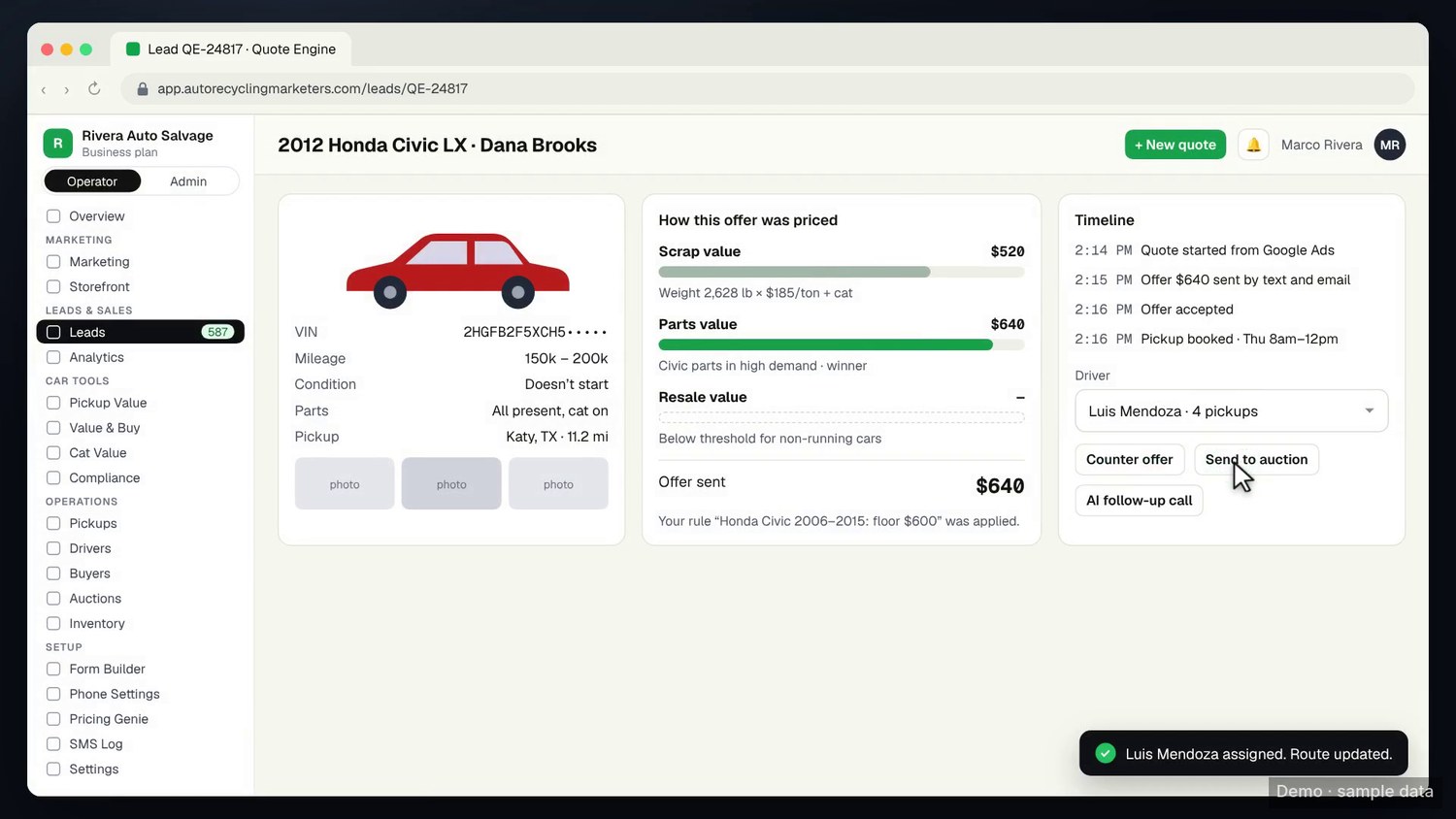
Under that simple experience is your pricing logic. A VIN or a few answers resolve to a vehicle, and your rules — base value, condition adjustments, catalytic-converter value, missing parts, wheels, fire or flood — produce a number you'd actually honour, not a random guess that wastes everyone's time at pickup. And the speed is itself a competitive weapon: research on lead response is brutally consistent — the business that responds first wins the lion's share of deals, because a motivated seller who gets a number now stops shopping. Giving an instant offer, then following up within minutes, is how you win the seller who also filled in three competitors' forms.
Embeddable widget 90 seconds to install
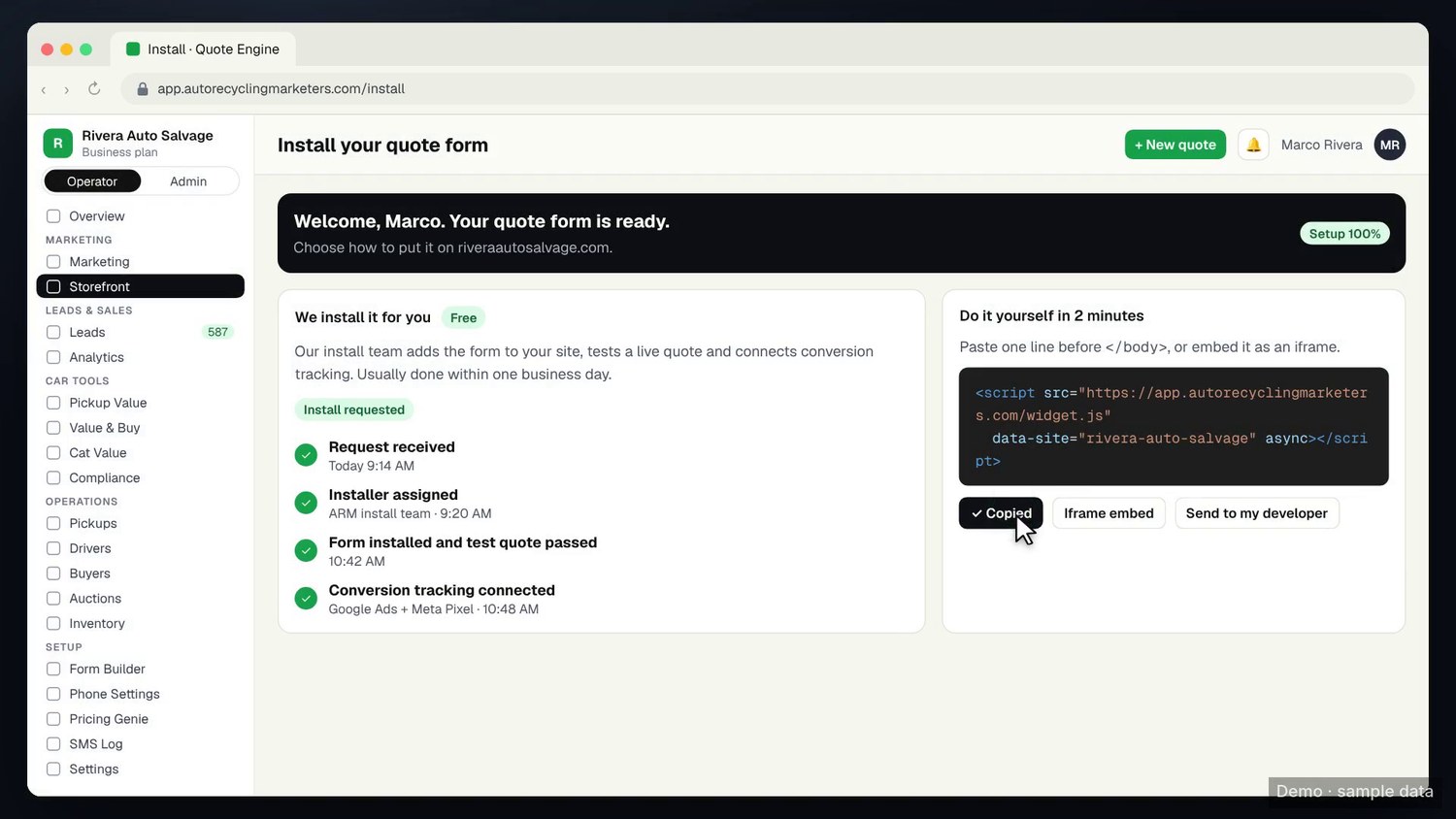
The offer engine drops onto any website you already own — WordPress, Shopify, Wix, Squarespace or plain HTML — with a single script tag, in about 90 seconds. So you don't have to rebuild your site to add instant offers; you bolt them onto the site you have. On the hosted landing pages from Part 2, it's already built in.
Customer offer portal
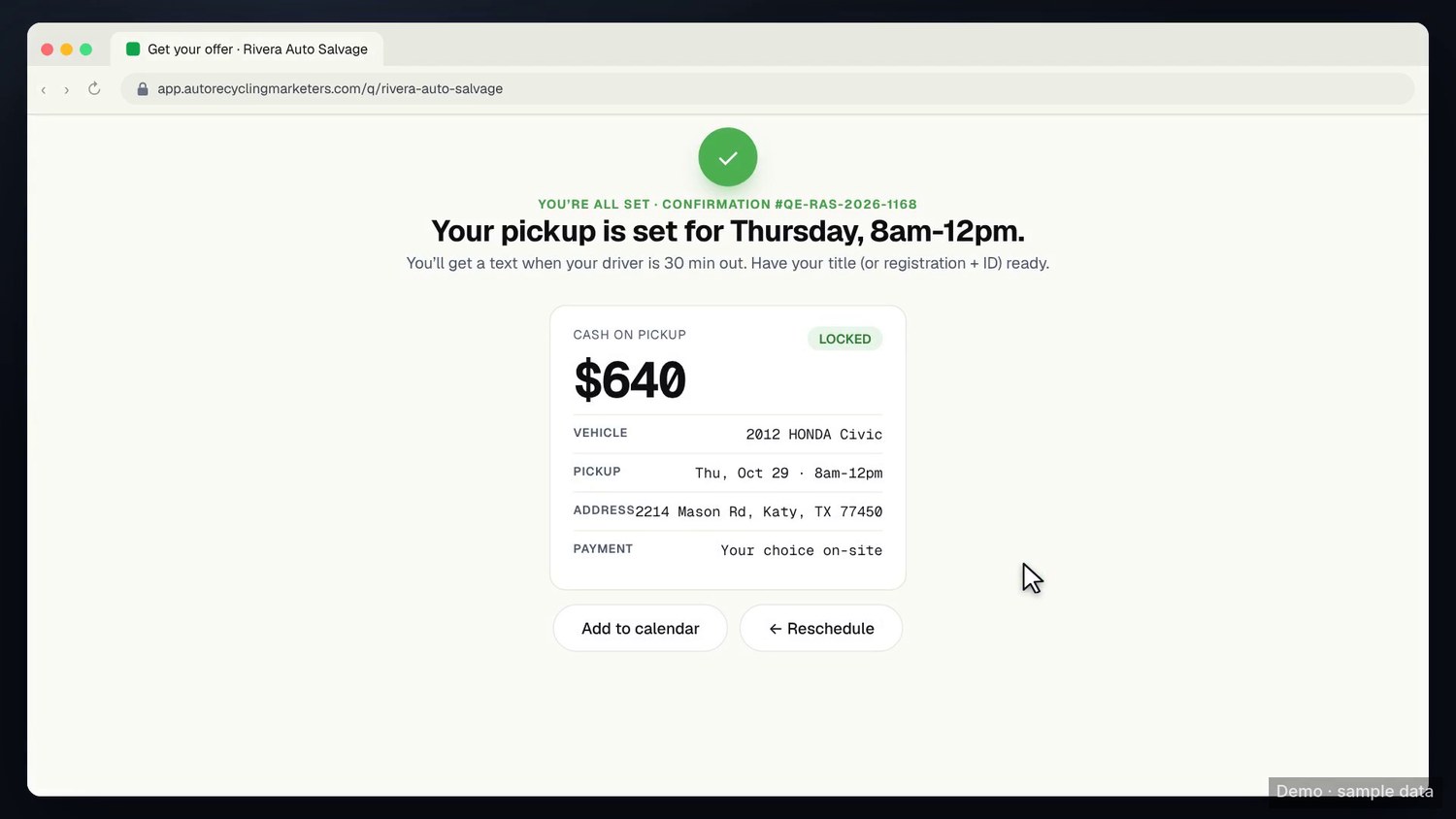
After the first offer, the seller gets their own tokenized portal link where they can see their offer, add or update photos, accept, and book a pickup time — a clean, branded experience that keeps them moving toward "yes" without a single phone tag.
What you operate
AI Phone Agent answers 24/7
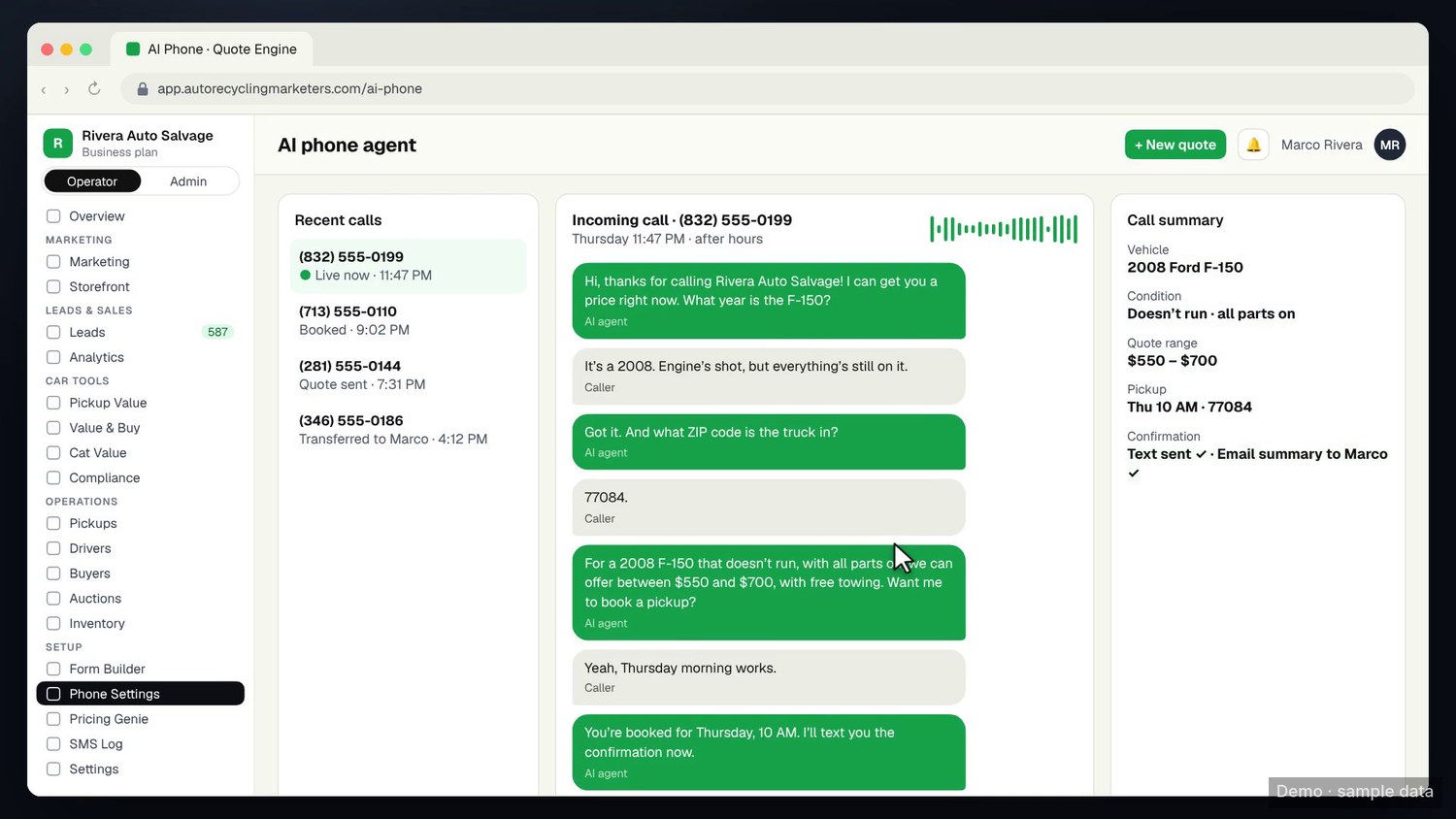
Leads call at all hours, and every missed call is a car that went to a competitor. The AI Phone Agent answers around the clock, speaks naturally, quotes from your pricing, captures the lead, and books the pickup — so after-hours and overflow calls become booked cars instead of voicemails. (It also closes the loop on the "after-hours spend" waste the ads audit flags — now those evening clicks actually get answered.)
SMS & AI follow-up calls recovers cold leads
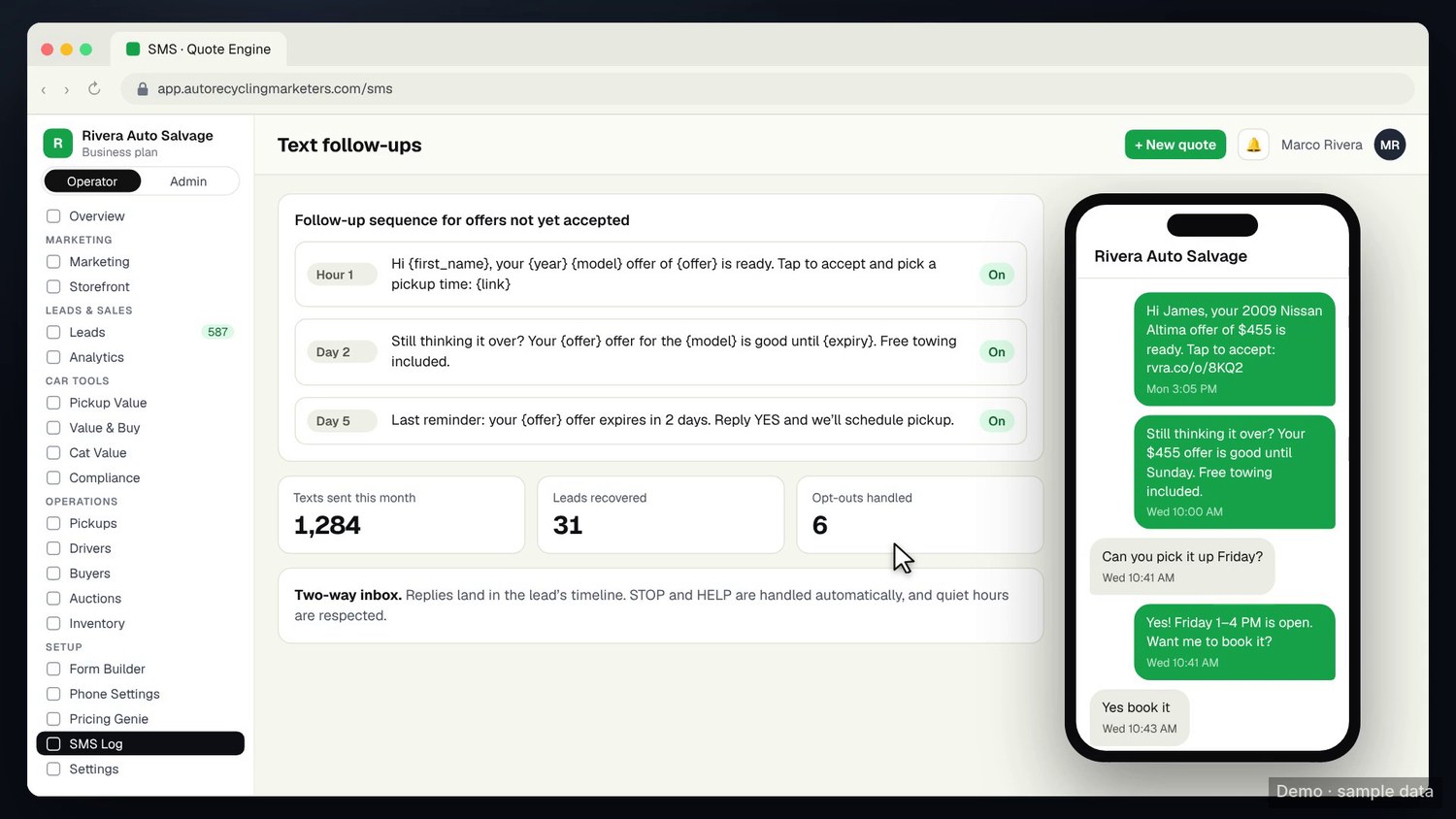
Most sellers don't accept the first offer — they shop around, then go cold. Automated SMS follow-up and AI follow-up calls re-engage those leads on a schedule, nudge them back to their offer, and recover a meaningful share that a manual team would simply never get to. It's the difference between a lead list that dies and one that keeps producing.
Pricing intelligence — Value & Buy, Pickup Value, Cat Value margin control
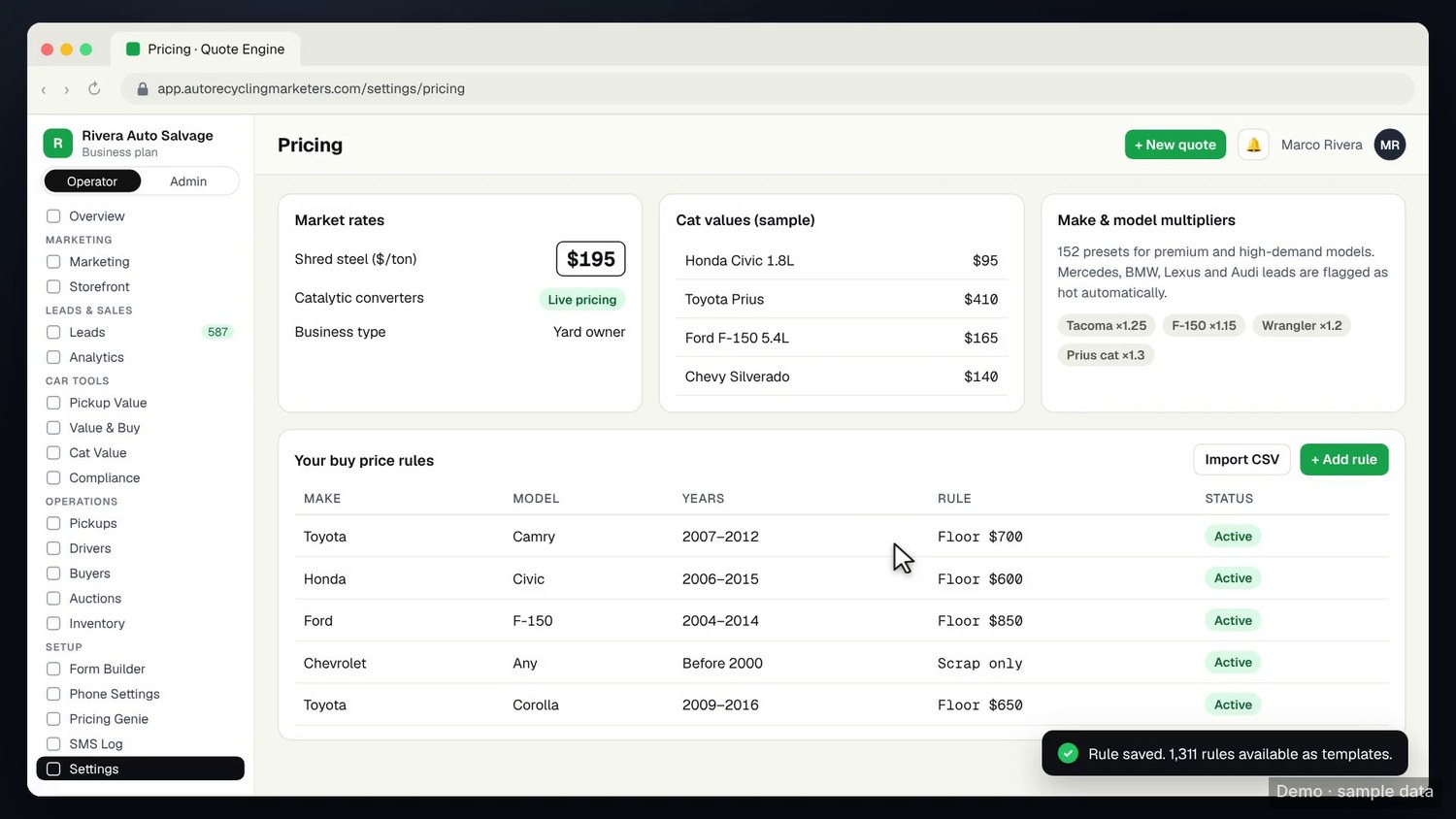
Accurate pricing is where margin lives, so the engine is built to price smart and protect it:
- VIN & vehicle pricing turns a VIN or a few answers into a defensible offer based on your rules.
- Value & Buy / Pickup Value work out what a car is worth to you and what you can pay at pickup.
- Cat Value prices catalytic converters — often the difference between a break-even car and a profitable one — so your offers reflect real recoverable value.
Pricing rules are yours to set and apply to every tenant-facing offer, and sensitive pricing math is kept away from people who shouldn't see it — drivers, for instance, never see your margin.
Driver & dispatch to the paid pickup
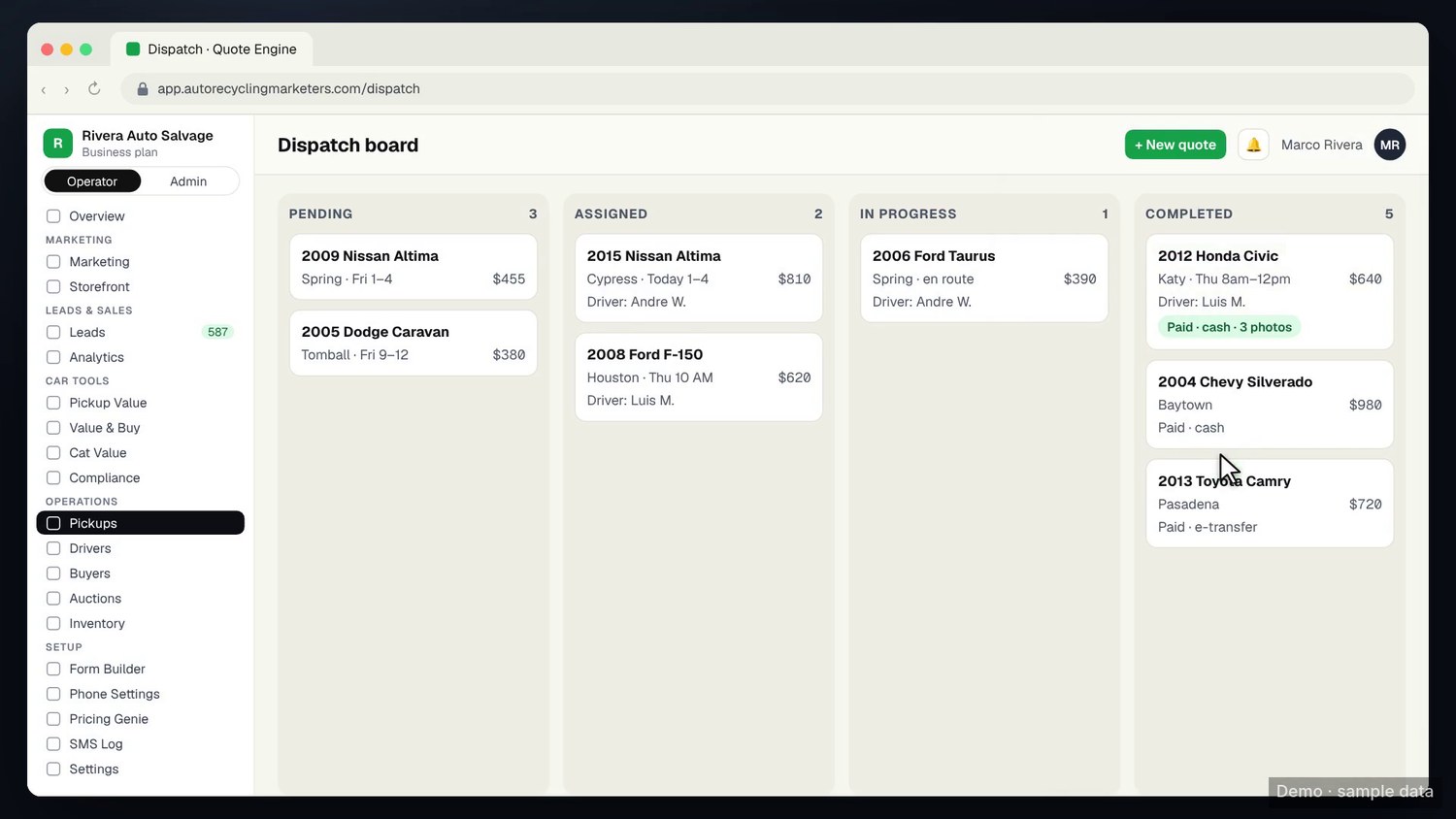
A booked car still has to be collected and paid for, and that's a logistics job. The dispatch system runs it end to end: a full pickup-status model, auto-assignment to the right driver, a dispatch board, GPS, ETA and geocoding, live customer tracking of the inbound truck, and driver and truck management. The seller watches the truck come; you watch the whole operation from one board. It's the last mile that turns a lead into a car physically in your yard.
Every pickup moves through clear stages — booked, assigned, en route, on site, collected — so nothing sits in limbo and you always know where each job stands. You can auto-assign to a designated driver or dispatch manually; tow jobs are handled as their own type; and when a car is won through the auction and the buyer collects it themselves, it follows a separate buyer-collect flow that bypasses your drivers entirely while still logging the hand-off. The customer, meanwhile, gets a live tracking link for the inbound truck — the kind of experience that turns a nervous first-time seller into a five-star review.
Auctions marketplace more per car
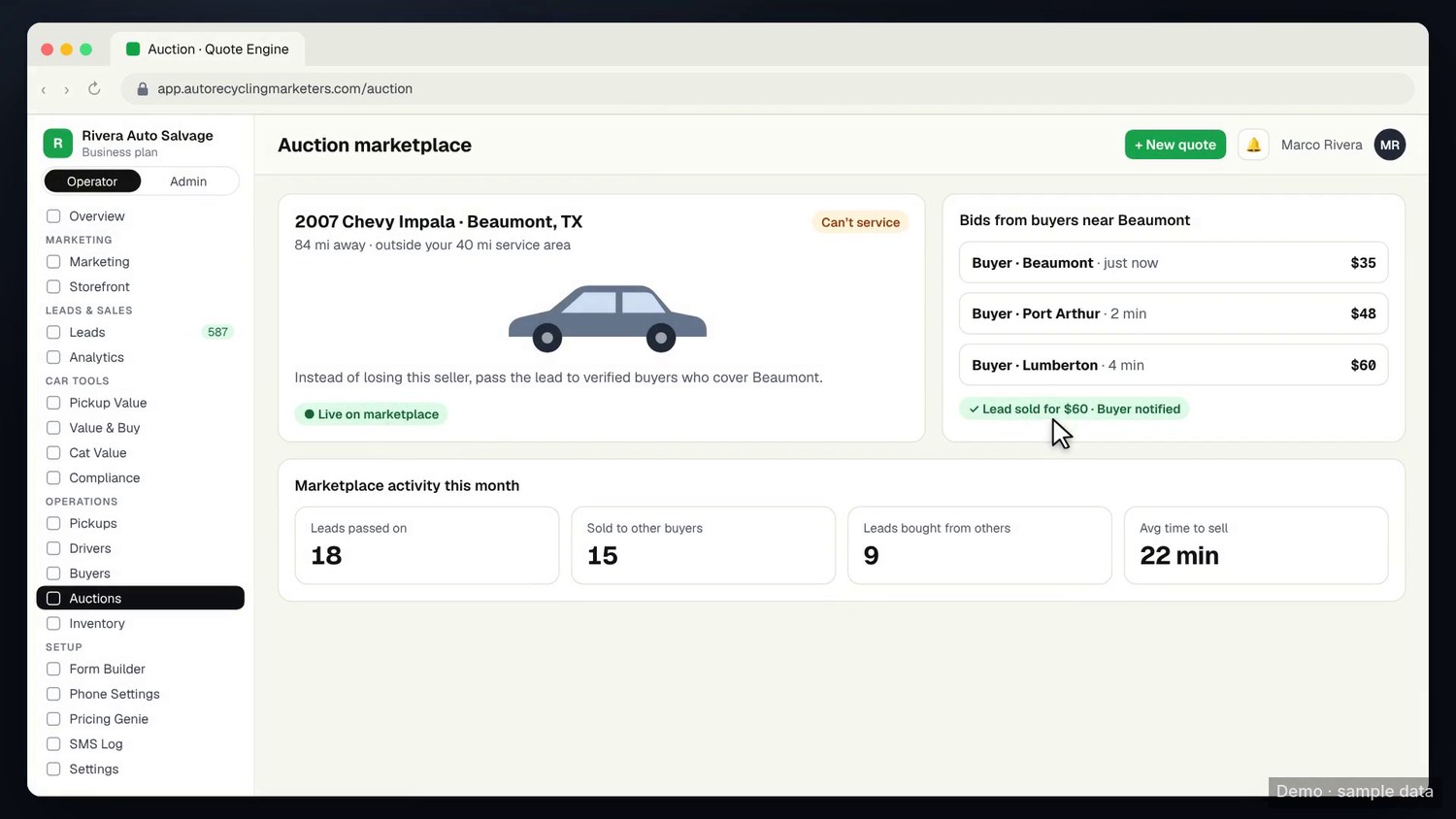
For cars worth more than a flat offer, a built-in auction marketplace lets qualified buyers bid — with bid enforcement, auto-close, bid history, a winner hand-off that shows the money split, and a buyer-collect pickup flow that bypasses your own drivers when the winning buyer collects. It's a way to squeeze more value out of the right cars instead of leaving money on the table.
Bill of sale & compliance paperwork, handled
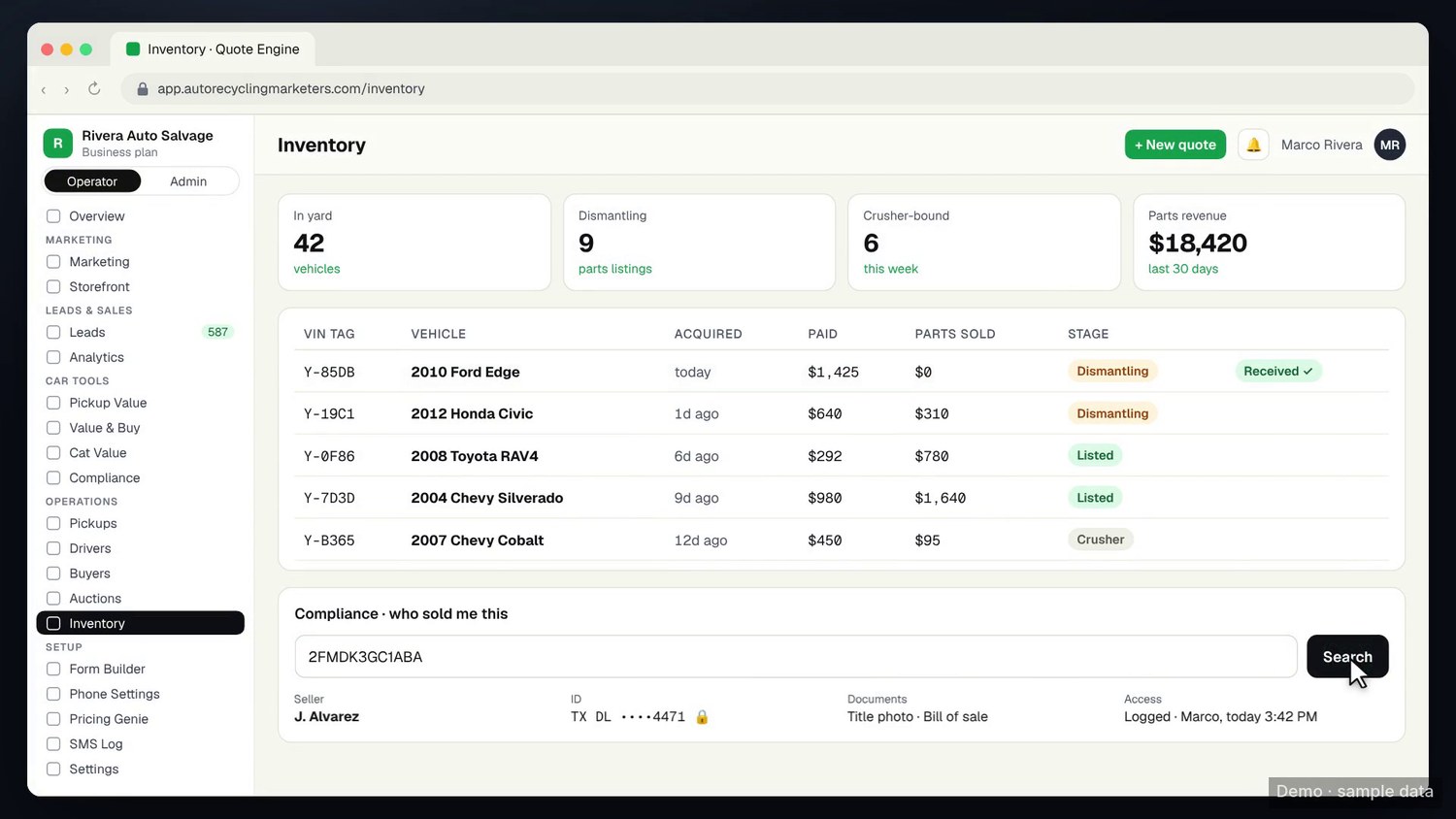
Every purchase needs clean paperwork. The engine generates a tenant-editable bill-of-sale PDF with live preview, tokenized sharing with the customer, and signature capture — gated so a final document only issues once it's approved (it carries a draft watermark until then). Compliance tooling keeps the buying process on the right side of the rules.
Analytics, tracking & white-label branding
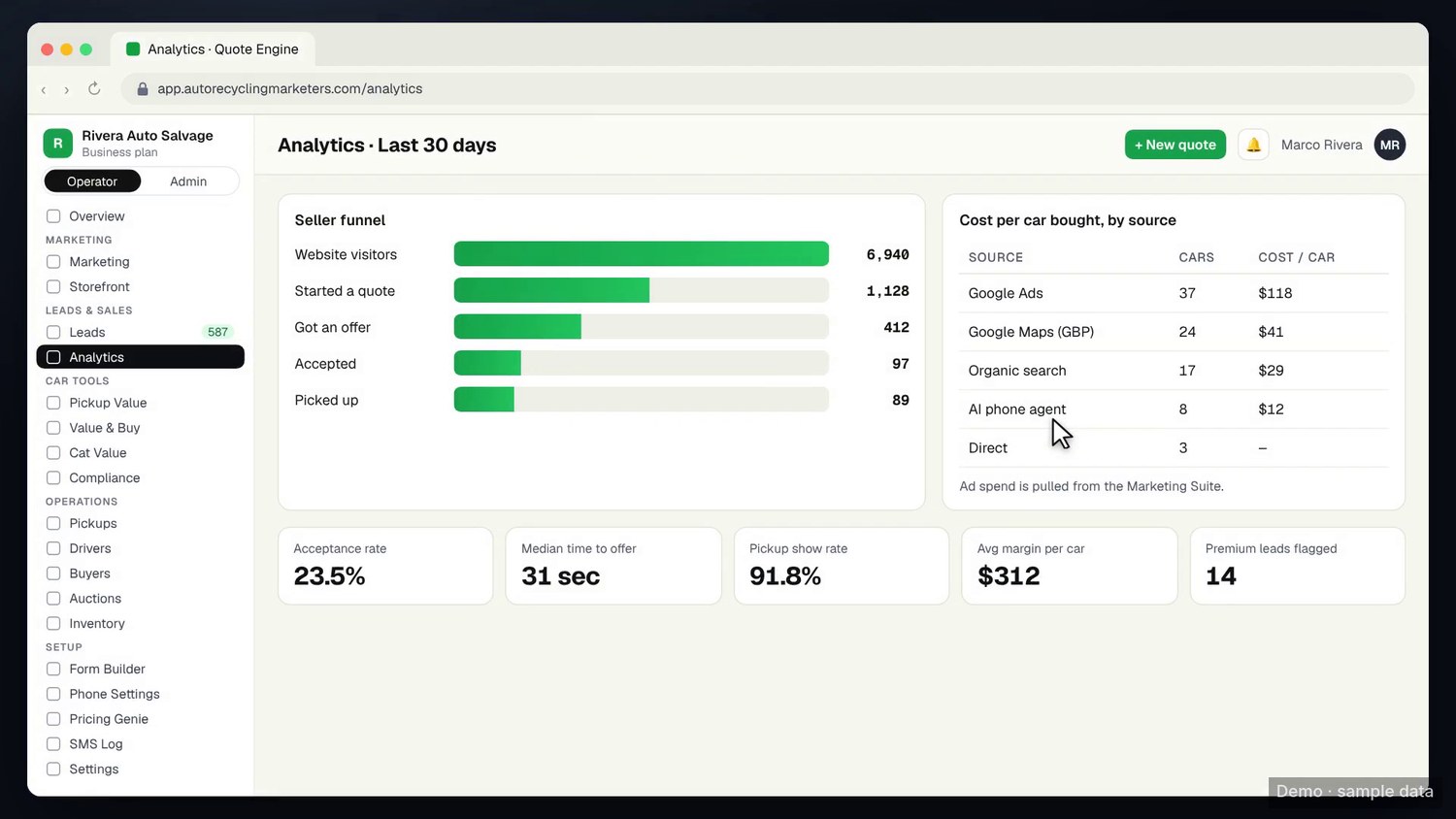
Analytics & tracking ties the whole funnel together — which sources produce leads, which leads become cars, and what each costs — the same attribution that makes the ad spend accountable. And the entire platform is white-label: your name, your colours, your branding on the widget, the portal, the pages and the reports. Your customers see you, not us.
Your quote form, your rules configurable
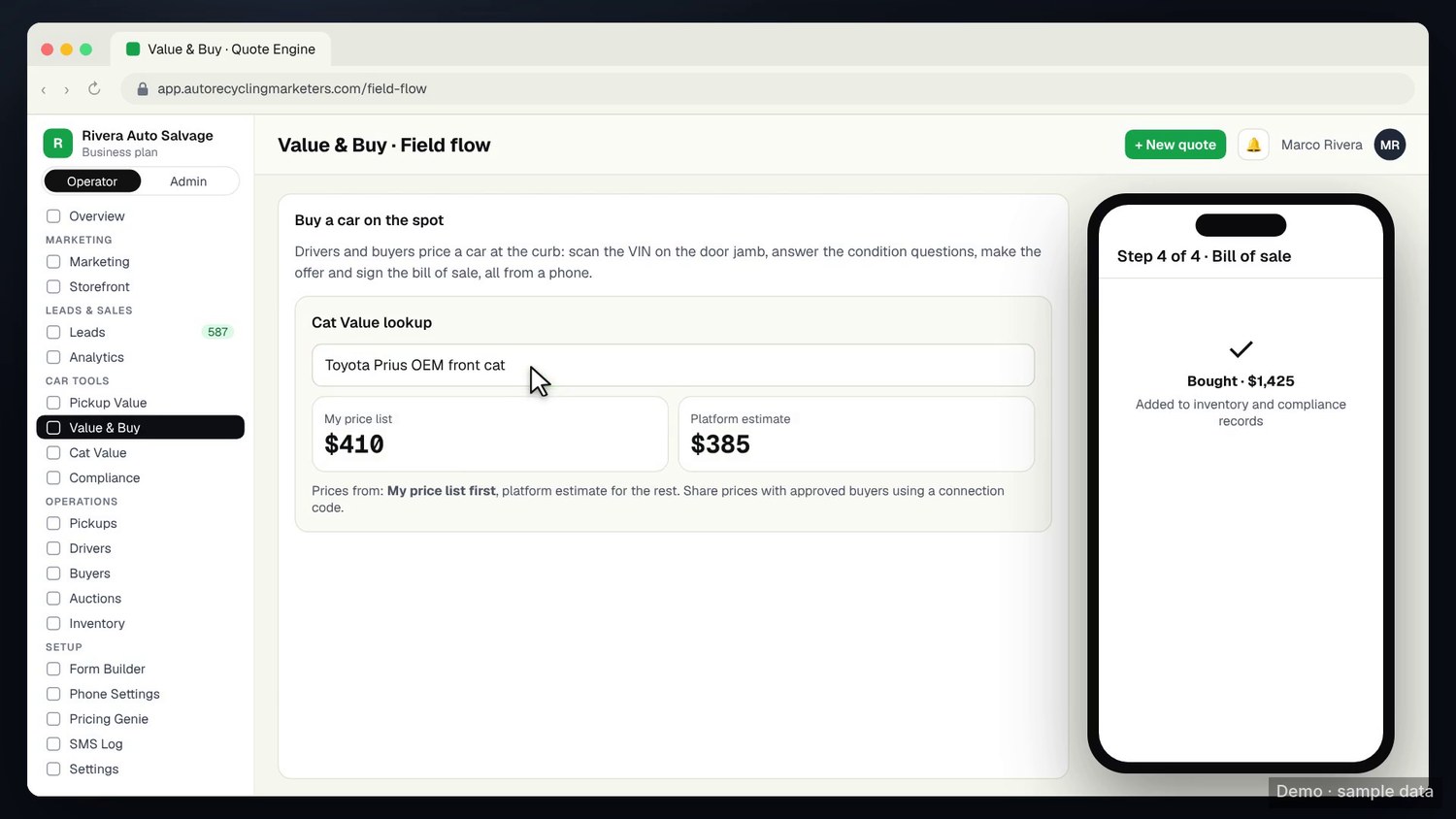
No two yards buy exactly the same way, so the quote flow is yours to shape — a custom form with the questions you want to ask, mapped to the pricing factors you care about (condition, catalytic converter, missing parts, wheels, fire/flood and more). Set the rules once and every offer across your sites follows them. On higher plans you get custom quote forms and your own branding throughout, so the whole experience reads as your business, not a third-party tool.
Security & price privacy margin protected
Because the engine quotes real money, it's built defensively. Signup and contact forms are protected with Cloudflare Turnstile, rate limiting and honeypot fields to keep bots and spam out of your lead flow. And your pricing logic is treated as the trade secret it is: a callback mode uses an allowlist approach that blocks every path a price could leak through, and drivers only ever see what they need to complete a pickup — never your margin, your pricing math, or what a car is really worth to you. The people who bring you cars can't see how you make money on them.
The buyer-to-tenant funnel the long game
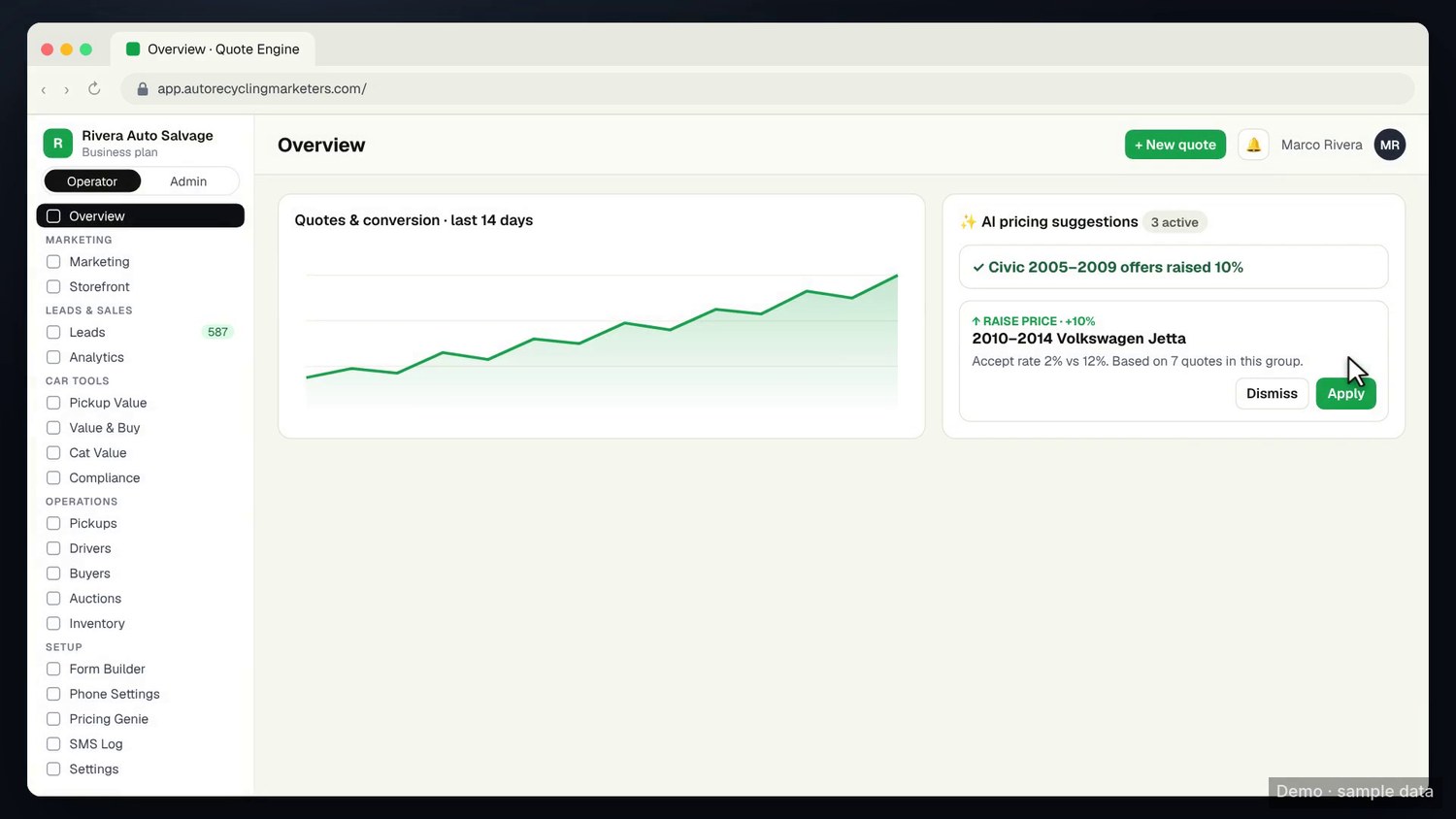
There's a strategic layer under all of this. The same data model that captures a car seller is designed so that a buyer you meet through the system — another yard bidding in your auctions, say — can later become a tenant running their own Quote Engine, keeping the relationships they built with no migration. In other words, the platform isn't just a tool for your yard; it's infrastructure the whole local market can run on, with you positioned at the center of it.
Part 7Plans & pricing
Start free, pay as it earns. The software scales with your volume; the done-for-you marketing is there the moment you'd rather hand it to specialists. Everything is month-to-month — no contracts — and all paid plans include unlimited quotes and no branding on your quote form.
The platform — four tiers
- 50 quotes / month
- Basic dashboard
- Email notifications
- SMS follow-up
- AI phone agent
- Unlimited quotes
- No branding watermark
- SMS follow-up (300/mo)
- Pricing customization
- AI phone agent
- Everything in Pro
- AI phone agent (200 min/mo)
- Phone number included
- Custom quote form
- 1,000 SMS/mo + 3 websites
- Everything in Business
- SEO included ($799 value)
- PPC included ($399 value)
- GBP included ($199 value)
- 250 voice min + 2,500 SMS/mo
- Dedicated account manager + monthly call
- Unlimited websites
The jump up the tiers follows the system in this page: Starter turns on the Quote Engine and lead capture for free. Pro ($97) unlocks unlimited quotes and SMS follow-up — the automation that recovers cold leads. Business ($297) adds the AI phone agent and a phone number so no call is ever missed. Enterprise ($1,499 + $899 one-time setup) bundles the entire done-for-you marketing operation — SEO, PPC and GBP managed by our team — on top of the full platform.
Done-for-you marketing — à la carte
On the free Starter plan you can still buy the managed services individually — pay only for what you need, month-to-month, no contract:
| Service | Price | What you get |
|---|---|---|
| SEO Management | $799/mo | Rank for junk-car keywords in your city. Runs on the Business plan, so adding it includes Business ($297/mo) in the same checkout. |
| PPC / Google Ads | $399/mo | Instant visibility on Google search — managed PPC for up to $15K/mo in ad spend. |
| Google Business Profile | $199/mo | Show up in the Google Maps top 3. |
| Website Maintenance | $299/mo | Content updates, security patches, performance monitoring. |
One-time services, pay once with no ongoing commitment:
| Website Design | $3,500 $8,000 | A custom site built to convert junk-car sellers. |
| Landing Page | from $999 | A high-converting page for a single campaign. |
| GBP Setup | $499 | Profile creation, optimization and citation building. |
The $899 setup is a one-time fee per account — it covers all the managed services, not each one — and SEO, PPC and GBP are included in Enterprise at no extra charge.
Why Enterprise is the value play
If you want the platform plus all three managed services, buying them separately is more expensive than the Enterprise bundle — because SEO management requires the Business plan to run on:
And Enterprise gives you more than the math shows — 2,500 SMS/mo (vs 1,000 on Business), 250 AI voice minutes/mo (vs 200), unlimited websites (vs 3), and a dedicated account manager with a monthly call. If you only need one or two services, à la carte is cheaper; if you want the whole engine run for you, Enterprise wins on both price and support.
Part 8Common questions
The questions junk car buyers and recyclers ask most often before they start.
Do I have to use both the marketing and the Quote Engine?
No. They're built to work together, but each stands on its own. Most operators start with the free Quote Engine to turn their existing traffic into more leads, then add marketing once they see it working. You can also take only the done-for-you marketing, or only the software — whatever fits where you are.
How fast can I be up and running?
The free account and quote form can be live in a couple of minutes — connect Google, drop the widget on your site, and you're capturing leads. Managed marketing (ads, SEO, GBP) takes a bit longer to set up properly, but the software side is same-day.
Will it work with the website I already have?
Yes. The Quote Engine widget installs on WordPress, Shopify, Wix, Squarespace or plain HTML with a single script tag — no rebuild required. And our SEO work is applied through that same snippet without editing your site's files, so there's nothing to break and nothing to migrate.
I already run Google Ads, or I have an agency. Can you take over my account?
Yes. The system connects to your existing Google Ads account and works with what's there — it reads your real spend, keywords and conversions, audits them, and improves from that baseline. You keep ownership of your account the whole time; nothing is locked to us.
Do I need a big ad budget to start?
No. You can start with the free software and no ad spend at all, and scale paid traffic at whatever pace your results justify. When you do run ads, the whole point of the optimization engine is to make a modest budget go further by cutting waste and concentrating spend on what actually buys cars.
Is my pricing and customer data private?
Yes. Your pricing logic is treated as a trade secret — callback mode blocks price-leak paths and drivers never see your margin or pricing math. Your leads and customer data are yours; the platform is multi-tenant and your workspace is isolated from every other operator's.
Do my drivers need an app?
Drivers work from the dispatch system with what they need to complete a pickup — assignment, address, status — and nothing they don't, like your pricing or margin. The customer gets a live tracking link for the inbound truck.
Why do you only work with junk car buyers and recyclers?
Because specialization is the advantage. The pricing logic, the keywords, the negative-keyword lists, the ad copy, the landing pages, the catalytic-converter values — all of it is built specifically for this business. A general agency has to learn your world from scratch; we already speak it.
Is there a contract?
The software is month-to-month. The managed marketing services are month-to-month too, with the one-time setup fee covering all of them together rather than each separately. You're never locked in.
Part 9Getting started
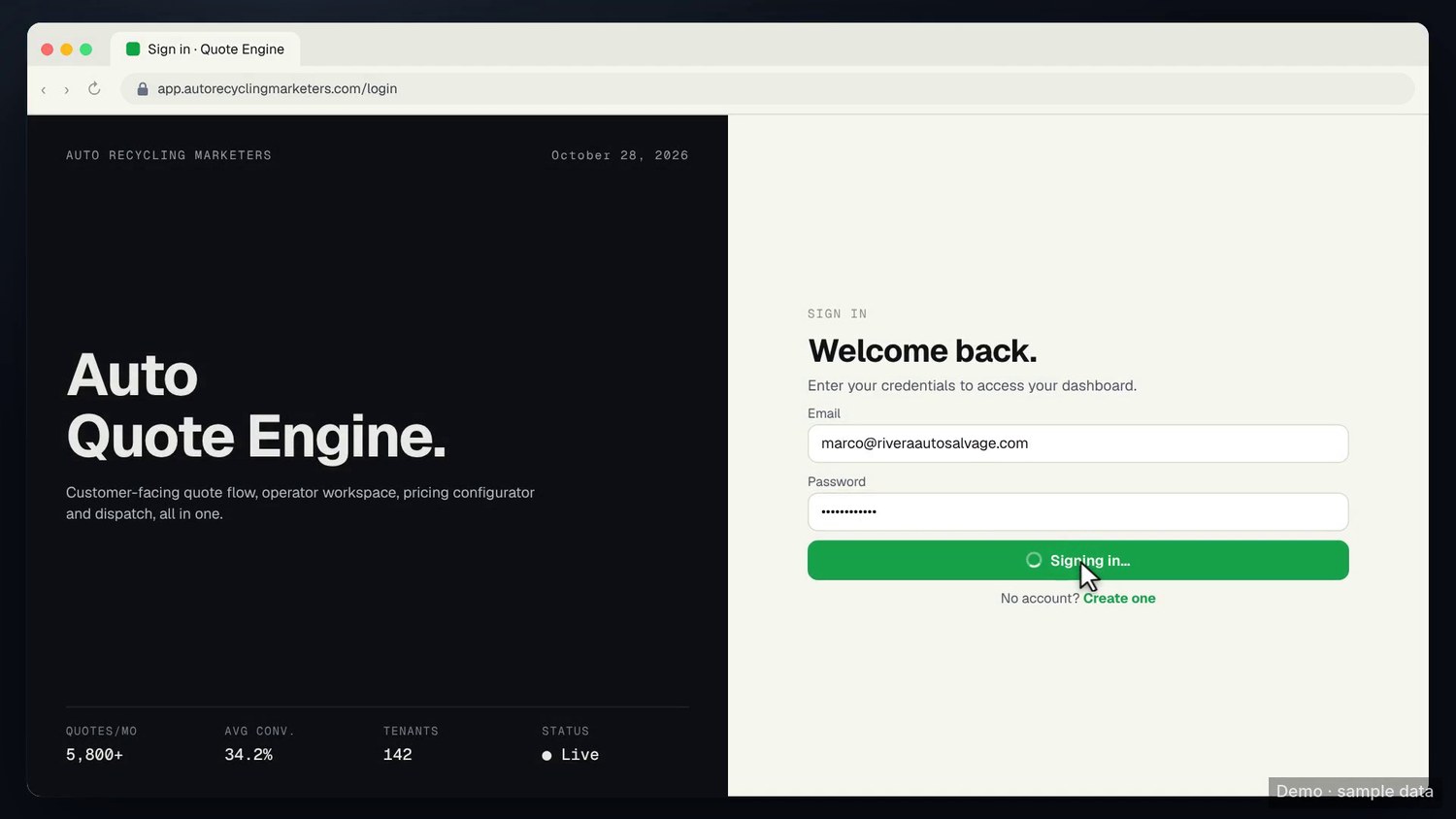
You've now seen the whole machine — the traffic engines that fill the funnel, and the Quote Engine that closes it. Starting is deliberately low-risk: turn on the free piece first, see real leads, then add the parts that pay for themselves.
The fastest path is the free account. Create it, run the five-step setup, drop the widget on your site, and you'll have instant offers capturing leads today — with no credit card and 50 free leads a month. From there, switch on the marketing that drives the traffic and the automations that close it, at whatever pace your numbers justify. Prefer to hand it off entirely? The done-for-you team runs the whole thing and reports the results.
Start your free account → Try the live demo Talk to us about done-for-you
No credit card. 50 free leads/month. Live in under 2 minutes.
Built for junk car buyers, scrap yards and auto recyclers across the US and Canada. The marketing that brings you the cars, and the engine that closes them — one connected system.